
Exploring Microsoft Foundry Local
With the Public Preview of Microsoft Foundry Local, Microsoft is taking a serious step toward bringing production-grade AI inference onto local hardware. After spending several days working with the preview, it became clear that Foundry Local is less about introducing another tool and more about establishing a new operating model for AI workloads.
This article takes a closer look at the architecture, core technical components, and my first hands-on experiences with Microsoft Foundry Local.
Architecture Overview
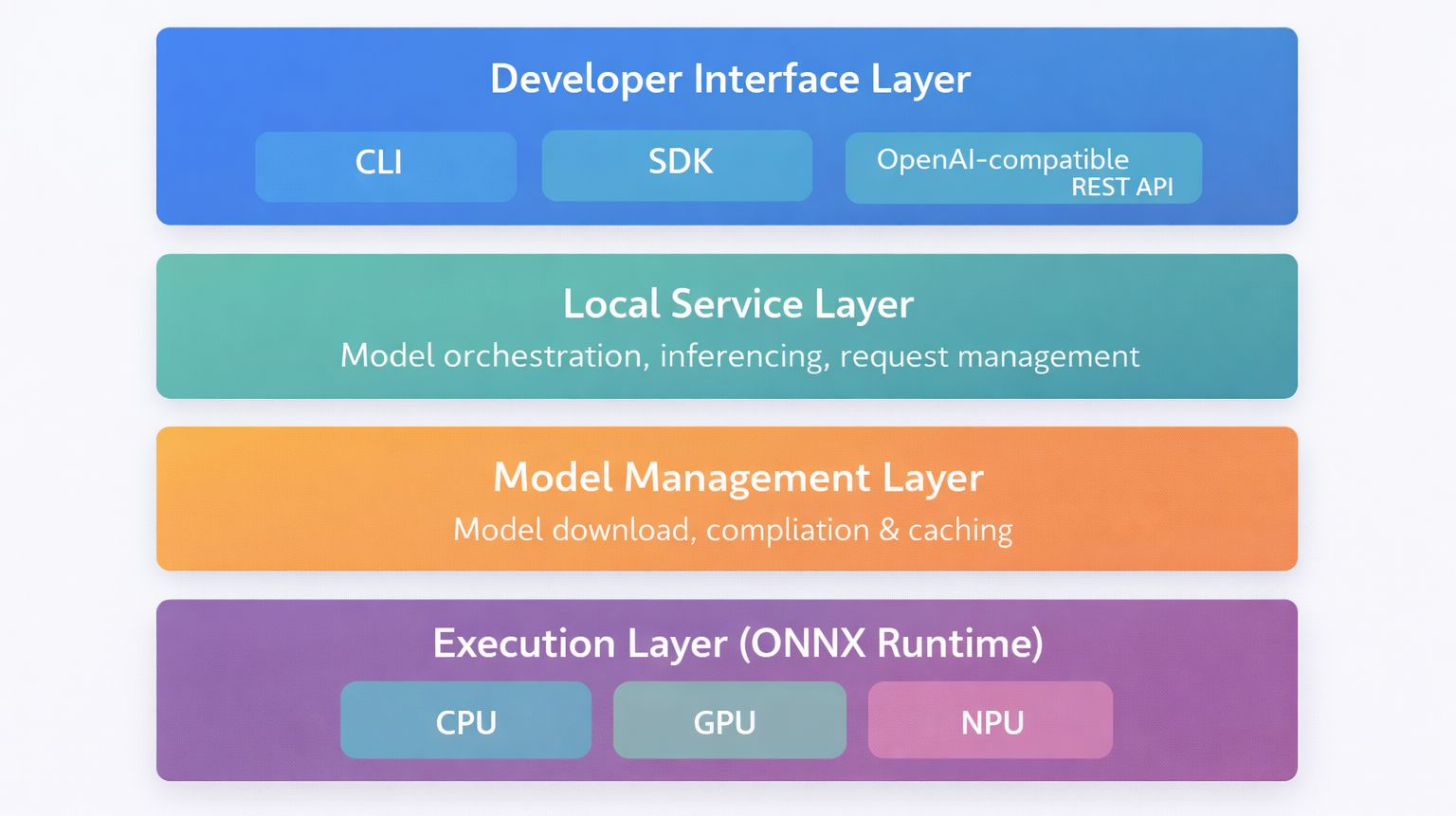
At a high level, Foundry Local is composed of several clearly separated layers that together form a local inference platform. The overarching goal is to provide the same developer experience developers expect from cloud-based AI services, while running entirely on-device.
Conceptually, the architecture can be divided into four main layers:
- Developer Interface Layer
This includes the CLI, SDKs, and the OpenAI-compatible REST API. From an application perspective, this is the only layer that matters. Code interacts with Foundry Local exactly as it would with a remote endpoint. - Local Service Layer
The Foundry Local Service acts as the orchestration and routing component. It manages model loading, handles incoming inference requests, and bridges the gap between application calls and the runtime engine. - Model Management Layer
This layer is responsible for downloading models from the Azure AI Foundry catalog, compiling them for local execution, and maintaining the local model cache. It ensures that models are optimized for the available hardware and reused efficiently. - Execution Layer (ONNX Runtime)
At the lowest level, ONNX Runtime executes the model using available hardware accelerators. Depending on the system, this may include CPU, GPU, or NPU execution providers. This is where hardware-specific optimizations take place.
What makes this architecture interesting is that it mirrors cloud-based AI infrastructure, but collapses it into a single machine. In cloud scenarios, model hosting, orchestration, scaling, and hardware acceleration are distributed across managed services. In Foundry Local, these concerns are consolidated into a structured local stack.
From my perspective, this layered design is what makes Foundry Local feel coherent rather than experimental. Even in Public Preview, the separation of concerns is clear. The CLI does not execute models directly. The runtime does not manage downloads. The service does not implement hardware acceleration. Each component has a defined role.
This separation is what enables portability. The same application code can target a local REST endpoint during development and a cloud endpoint in production, without architectural rewrites.
Core Technical Components
Foundry Local Service
The Foundry Local Service runs as a local background service and exposes an OpenAI-compatible REST API. Applications can interact with local models in the same way they would call a cloud-based OpenAI or Azure OpenAI endpoint.
Before making inference requests, the service must be started locally. The screenshot below shows the Foundry Local Service running in my environment, exposing the REST endpoint on localhost and ready to accept requests.

This level of API compatibility is a deliberate design choice and a key strength of Foundry Local. Existing applications can often be moved to local inference with little to no code changes.
ONNX Runtime as the Inference Engine
Under the hood, Foundry Local relies on the ONNX Runtime to execute models efficiently across different types of hardware.
Supported execution providers include:
- CPU
- GPU
- NPU on supported modern hardware platforms
The explicit focus on NPU support highlights where local AI is heading. Sustainable on-device inference at scale is only feasible with specialized silicon that can offload these workloads from the main processor.
Model Management and Local Cache
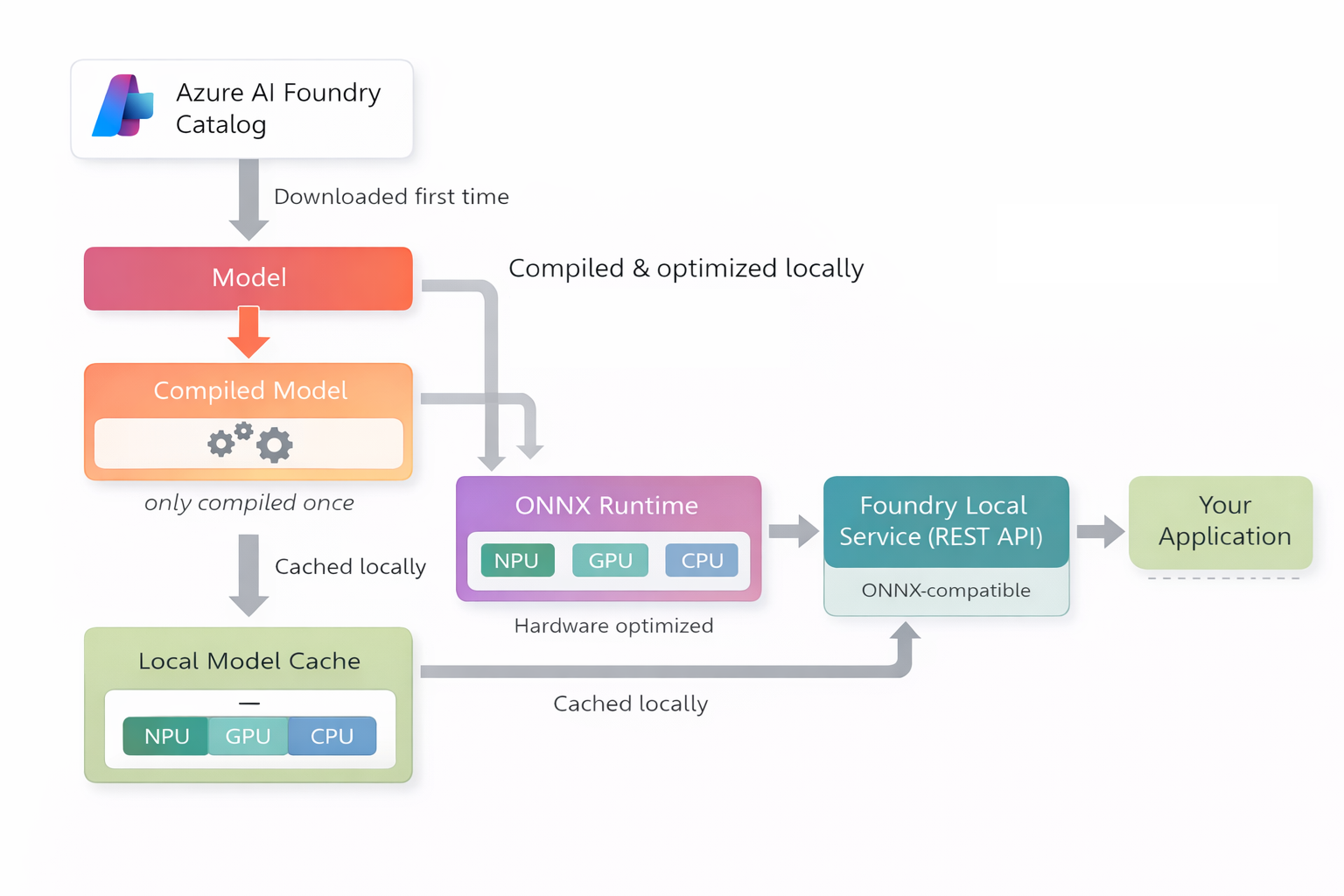
Foundry Local includes built-in model management that handles the full lifecycle of a model. Models are pulled from the Azure AI Foundry catalog, compiled and optimized locally, and then stored in a local model cache for reuse.
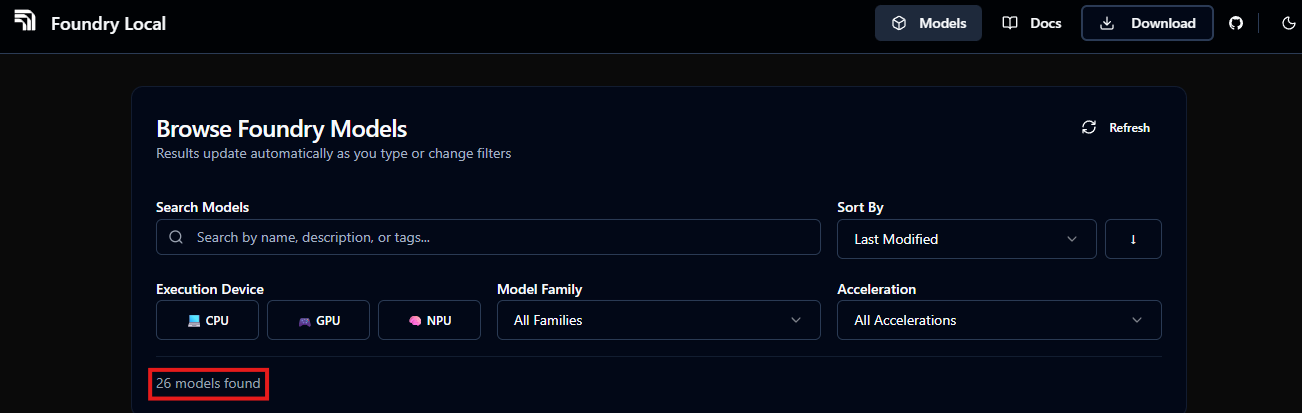
At the time of writing, the set of models that can be used directly with Foundry Local is still limited. Currently, roughly two dozen models are officially supported, primarily smaller and medium-sized open models optimized for local inference. The available models span several families, including Phi, Mistral, Qwen, DeepSeek and Whisper, covering both generative language and speech-to-text use cases. This reflects the current Public Preview state rather than a conceptual limitation of the platform.
Beyond the built-in catalog, Microsoft also provides a supported path to use additional models by compiling selected Hugging Face models for Foundry Local. This process allows developers to bring their own models into the local runtime, as long as the model architecture, format, and configuration meet the current compatibility requirements. While this approach expands the range of usable models, it requires manual compilation steps and deeper familiarity with the toolchain.
Once a model is cached locally, Foundry Local can reuse the compiled artifact across inference runs, even when the system is offline.
This approach enables:
- Reuse of previously downloaded and compiled models
- Fast switching between supported models without repeated downloads
- Offline operation once models are available locally
CLI, Inference, and Real-World Behavior
Installation and First Startup Experience
Installing Foundry Local was straightforward in my environment. Using the package manager, the installation completed within a few minutes and registered the foundry CLI globally.
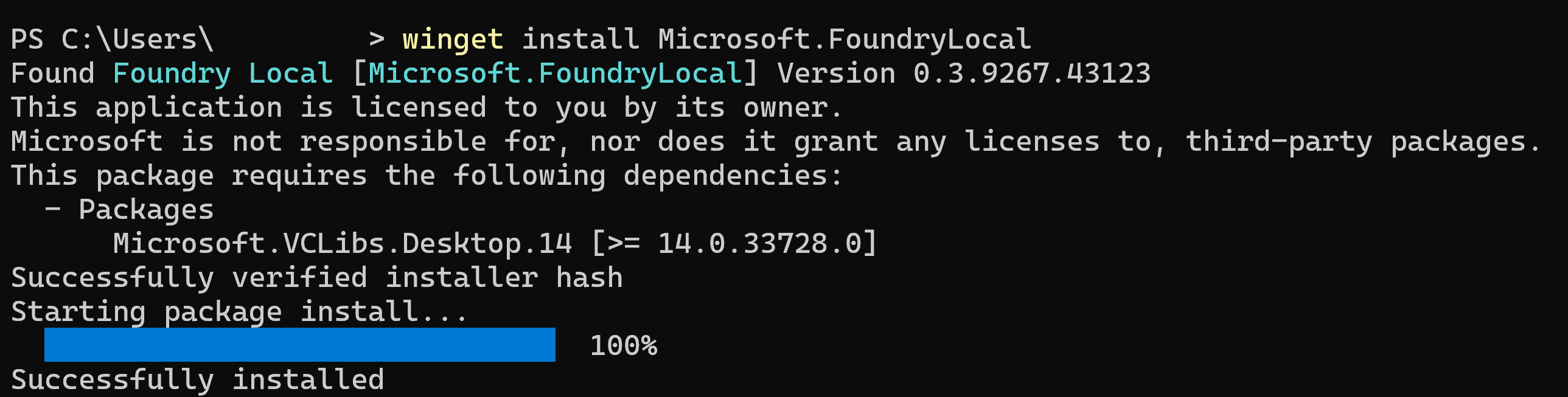
The first interesting moment came when starting the local service. On initial startup, Foundry Local prepares its runtime environment and checks hardware capabilities. On my system, this took noticeably longer than subsequent restarts.
Personal observation:
The very first interaction makes it clear that this is not just a lightweight CLI wrapper. The runtime initialization and hardware probing underline that Foundry Local behaves more like a local inference server than a simple development tool.
Exploring the CLI workflow
Once installed, the CLI becomes the primary interface for managing models and services.
Key commands I used early on:
foundry model list– List all available modelsfoundry model download <model>– Download a model to local cachefoundry model run <model>– Chat completion support (NOTE: downloads the model if needed)foundry service status– Check the status of the service
Listing available models
Running foundry model list displays the currently supported models along with their execution targets (CPU, GPU, NPU).
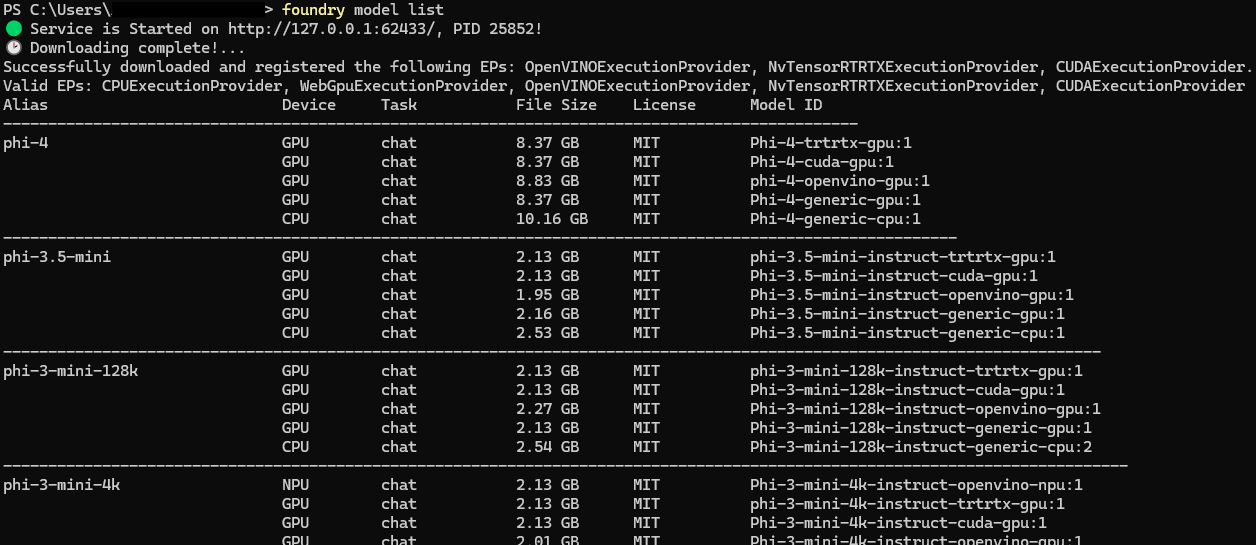
The output immediately shows two important aspects of Foundry Local:
- Model family availability
- Hardware execution providers available on the system
This makes hardware awareness visible from the very first interaction.
Downloading and running a model
Pulling a model triggers the download and local preparation process.
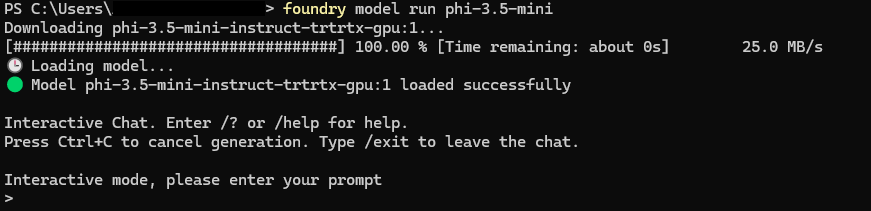
The first pull is where you feel the real weight of local inference. Depending on model size and connection speed, this can take several minutes. Compilation and optimization steps happen locally before the model becomes usable.
Service status and execution providers
The foundry service status command confirms that the local service is running and lists the active execution providers.

This is particularly useful for verifying whether GPU or NPU acceleration is active. In my case, the runtime detected multiple execution providers, including CUDA and ONNX execution backends.
Starting a model in interactive mode (foundry model run) launches a local chat session backed by the selected model.
Personal observations
Smaller models download quickly, but compilation and optimization steps introduce noticeable latency on first run. Subsequent executions are significantly faster due to the local cache.
What stood out to me is how transparent Foundry Local is about what it is doing. You see execution providers. You see download progress. You see service endpoints. It feels less like a black box and more like a controllable local inference stack.
Making a real inference call
Once the service is running and a model is available locally, the next step is validating the full request path end to end. I tested inference both through the CLI and through a minimal Python script against the OpenAI compatible local endpoint.
Inference via CLI
Foundry Local supports an interactive chat mode directly from the CLI. This is the quickest way to confirm that the model loads correctly and that the runtime is able to execute requests.
In interactive mode, I used short prompts first to validate stability, then longer prompts to observe latency and resource utilization.
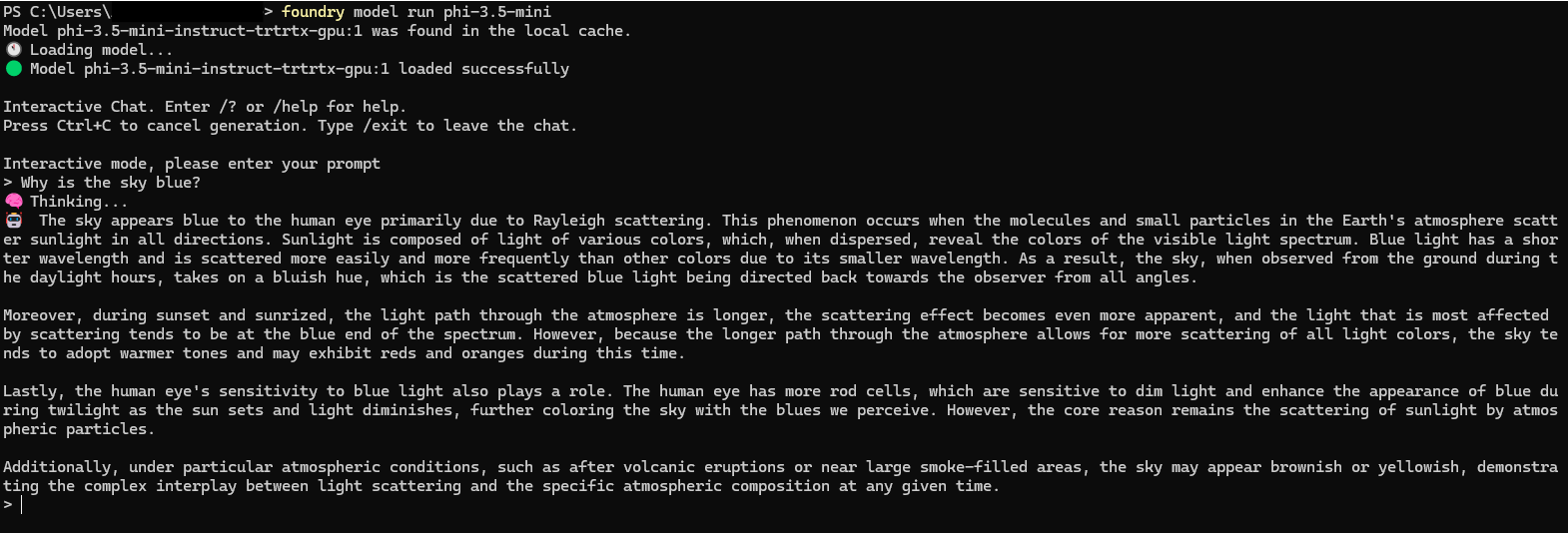
From my experience, the interactive mode is ideal for smoke tests. You immediately see whether the model loads, whether the service is responsive, and whether performance is acceptable on your current hardware.
Inference via Python against the local REST API
To test application integration, I used a small Python script that calls the local endpoint using an OpenAI compatible client configuration. The only meaningful difference from a cloud setup is the base URL pointing to localhost.
import openai
from foundry_local import FoundryLocalManager

alias = "phi-3.5-mini"

manager = FoundryLocalManager(alias)

client = openai.OpenAI(
    base_url=manager.endpoint,
    api_key=manager.api_key
)

print("What is your question?")
print()
question = input()

response = client.chat.completions.create(
    model=manager.get_model_info(alias).id,
    messages=[{"role": "user", "content": question}]
)

print()
print("Foundry Local response from model (" + alias + "):")
print(response.choices[0].message.content)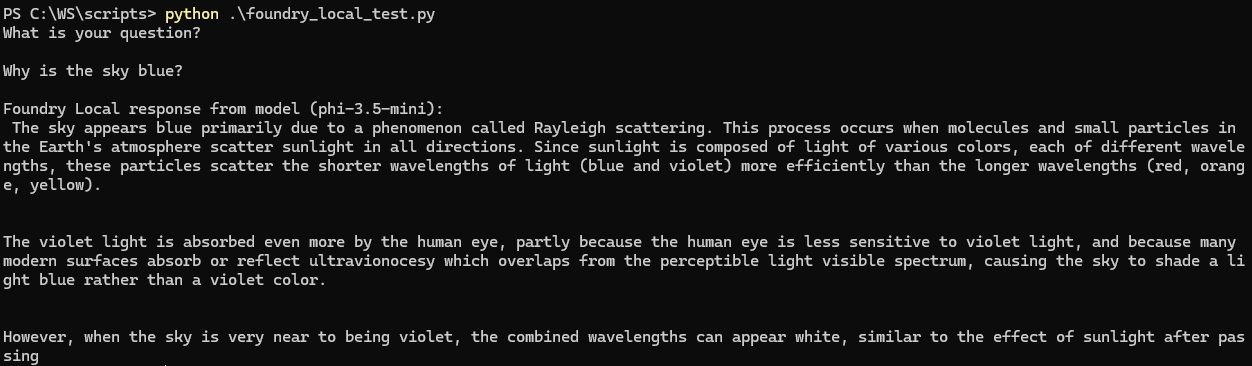
Personal note: This is where Foundry Local really clicked for me. The integration pattern feels familiar. Local inference becomes a deployment target, not a different programming model.
Hardware behavior and execution providers
One of the most interesting parts of Foundry Local is how visible hardware acceleration becomes. ONNX Runtime sits underneath the service and uses execution providers depending on what your system supports.
I used the CLI to verify service status and confirm which execution providers were registered.
foundry service statusOn my system, the service reported multiple available providers, which aligned with the hardware I expected. This is a useful sanity check, especially when you are trying to validate whether GPU or NPU acceleration is actually being used.
Note, that local inference is brutally honest. If acceleration is missing or misconfigured, you feel it immediately in latency and responsiveness.
If you want to add a lightweight benchmark without making it scientific, you can do something like this:
- same prompt, same model
- run once after model load and once after warm up
- record rough response time
Conclusion
Even in its current Public Preview state, Foundry Local feels architecturally coherent and technically grounded. The separation between service orchestration, model management, and runtime execution is clear, and the OpenAI-compatible interface makes integration straightforward.
Today, the primary constraints are model availability and hardware capacity rather than missing core functionality. As model support expands and NPU adoption increases, local inference will likely shift from experimental to mainstream for many development and edge scenarios.
Foundry Local does not replace cloud AI. It complements it. And in doing so, it introduces a serious new deployment option for AI workloads.