
Hands-On with GPT-Realtime-1.5 on Azure
The transition from purely text-based chats to fluid, real-time audio conversations is the next massive leap in human-computer interaction. When I saw that Microsoft moved the new gpt-realtime-1.5 model out of preview and into General Availability (GA) on the Azure AI Foundry, I had to test it immediately.
Historically, developers had to rely on “chained” architectures for voice bots (Speech-to-Text -> Text-LLM -> Text-to-Speech), which inevitably caused unnatural latency. The Realtime API solves this by natively processing audio inputs and outputs end-to-end.
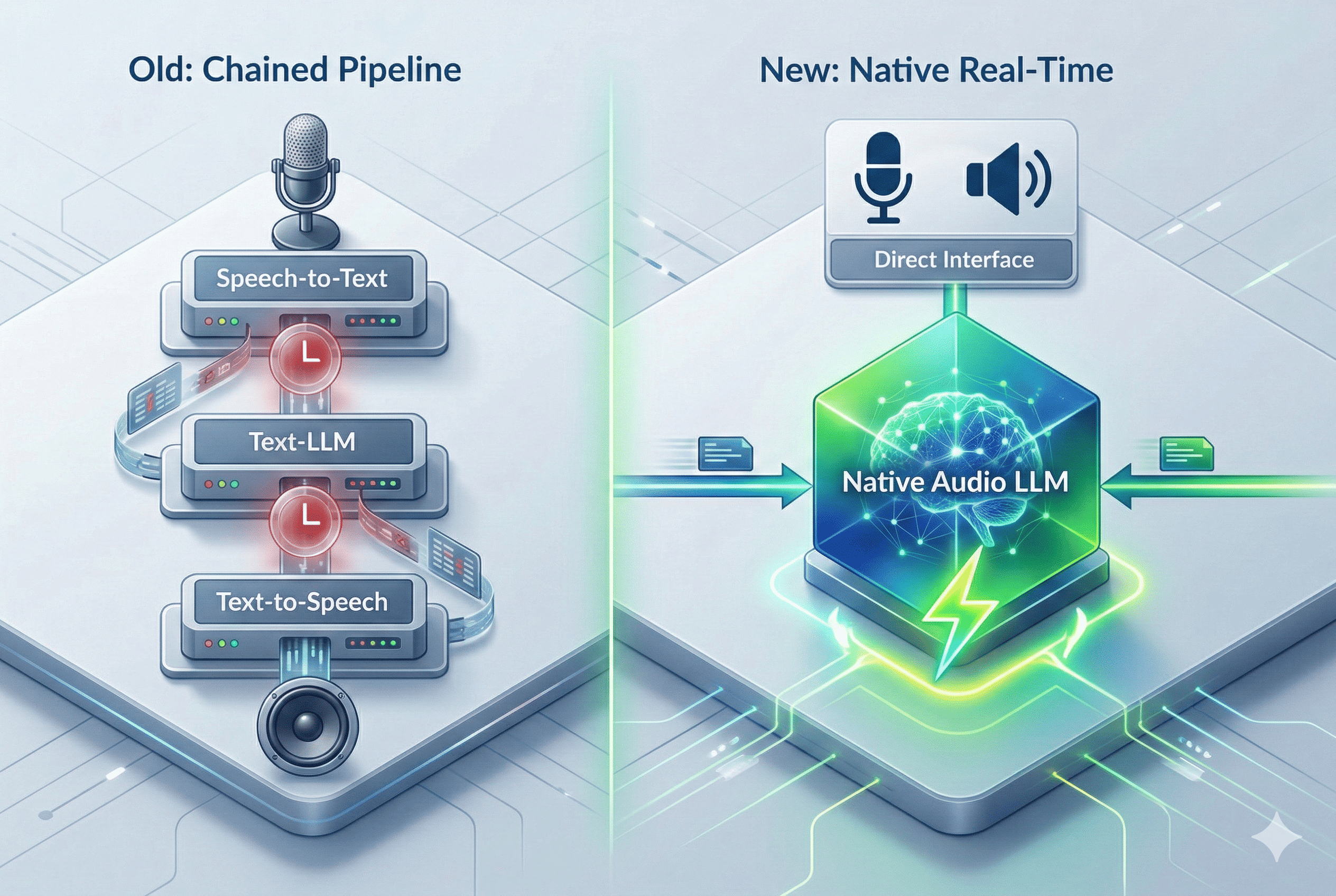
To demonstrate how this works in practice, I created a Python based reference project in GitHub. In this post, I will walk you through what the new 1.5 model brings to the table, the critical breaking changes you need to know for your Azure integration, and how you can run the code locally.
What’s New?
As noted by Microsoft’s Naomi Moneypenny, the upgrade to the 1.5 variant introduces several crucial improvements for production-grade voice agents:
- Massive Accuracy Boosts: OpenAI and Microsoft report a +10.23% improvement in alphanumeric transcription accuracy. This is a game-changer for enterprise use cases where the agent needs to accurately capture spelled-out serial numbers, VINs, or passwords.
- Smarter Reasoning & Instruction Following: The model shows a +5% lift on Big Bench Audio (which tests logical reasoning on audio inputs) and a +7% improvement in strictly following developer instructions.
- More Natural Voices: The audio output is noticeably smoother with better pacing, and introduces two new standard voices, Marin and Cedar.
Setup & Critical Breaking Changes in Azure
To test the model, you need to deploy gpt-realtime-1.5-2026-02-23 in your Azure portal (currently available for global deployments in East US 2 and Sweden Central).
Retrieve your Azure Credentials
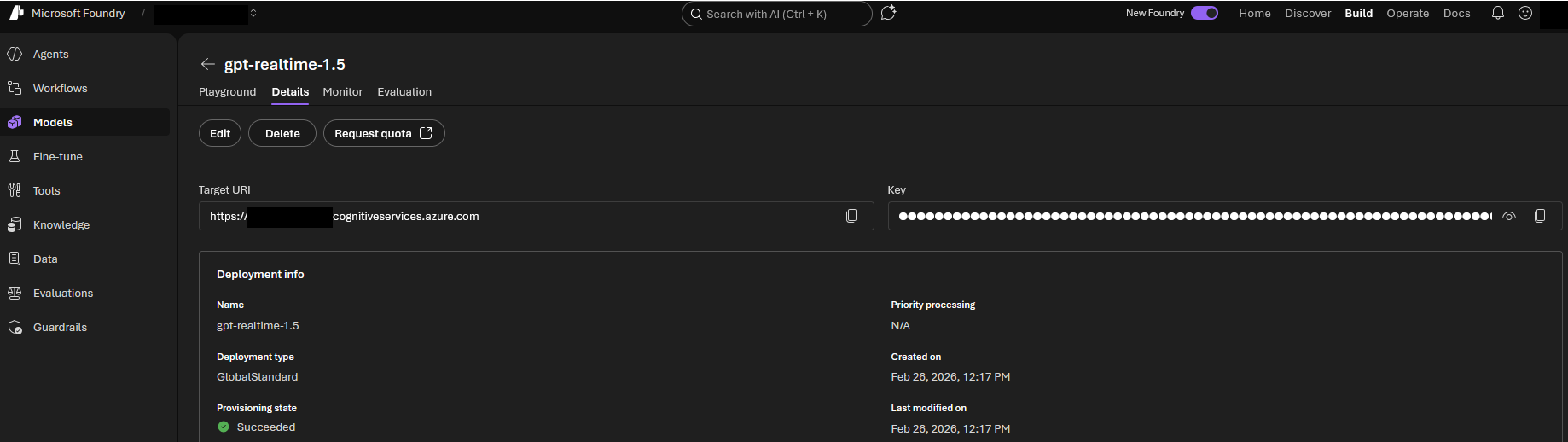
The navigation for credential retrieval has changed in the new Microsoft Foundry portal. Do not look for global project settings. Instead, follow this direct path:
- Click on Start building and select Browse models from the dropdown menu.
- Search the model catalog and select gpt-realtime-1.5.
- Open the Details tab of your deployed model.
Here you will find two crucial values: The Target URI and the Key.
Architecture Note: Microsoft labels the endpoint as “Target URI” in the UI. This exact value must be mapped to your AZURE_OPENAI_ENDPOINT environment variable in your Python script. Your Deployment Name is the exact custom name you assigned during the initial provisioning.
CRITICAL WARNING: The GA Endpoint Migration
Moving to General Availability (GA) introduces a major breaking change to the Realtime API endpoint. Microsoft has set a strict migration deadline for April 30, 2026. If you are using custom scripts, you must update your connection logic:
- New Path: Your endpoint URL must now include
/openai/v1. Example:https://<YOUR_RESOURCE>.openai.azure.com/openai/v1. - Drop the API Version: The previously required
api-versionquery parameter (e.g.,?api-version=2024-10-01-preview) must be entirely removed for GA endpoints.
Architecture: How the Python Script Works
Building a fluid voice agent in Python means you have to capture microphone input, stream it to the model, and play the incoming response simultaneously—achieving true full-duplex communication. My repository handles this using the following stack:
- Audio Streaming (
pyaudio): Captures your raw microphone input and drives the speaker output. - WebSockets: Maintains a persistent connection to Azure OpenAI. (Architecture Tip: WebSockets are perfect for backend or server-to-server orchestration. If you are building a frontend directly in the browser, consider WebRTC instead to reduce latency and utilize built-in echo cancellation.)
- Concurrency (
asyncio): Asynchronous programming is not optional here. Running the send and receive tasks concurrently is what allows the system to handle user interruptions (“barge-ins”) gracefully and instantly halt playback when you speak over the agent.
The FinOps Angle: Managing Token Costs
Since we focus on enterprise Azure architecture, we have to talk about the bill. Native audio tokens are premium: the standard rate for gpt-realtime-1.5 is $32.00 per 1 million input tokens and $64.00 per 1 million output tokens.
The absolute advantage here is Prompt Caching. If you cache your static system instructions and retrieval contexts, your input costs plummet down to just $0.40 per 1 million cached input tokens. Architecturally, you must design your sessions to leverage this caching if you want to run high frequency interactions economically.
Quick Start: Try It Yourself!
Clone the repository and spin up your own voice agent in minutes:
# Clone the repo
git clone https://github.com/Frezz146/talking-with-realtime-audio-llm.git
cd talking-with-realtime-audio-llm

# Create a virtual environment
python -m venv .venv
source .venv/bin/activate  # On Windows use: .venv\Scripts\activate

# Install dependencies
pip install pyaudio openai[realtime] azure-identity
Set your Azure environment variables:
export AZURE_OPENAI_ENDPOINT="https://<YOUR_RESOURCE>.openai.azure.com"
export AZURE_OPENAI_DEPLOYMENT_NAME="gpt-realtime-1.5"
export AZURE_OPENAI_API_KEY="your-api-key"
Start the script with:
python talking-with-realtime-audio-llm.pyLive-Demo Ideas to stress-test the model:
- The Alphanumeric Test: Dictate a complex Wi-Fi password or a license plate number to see the 10% accuracy bump in action.
- The Interruption Test: Ask a long question and interrupt the agent mid-sentence. Watch how fast it stops the audio playback and pivots to your new intent.
Publishing the LLM: Moving to Production
Running PyAudio locally is great for testing, but it is not a deployable architecture. To publish your voice agent for actual users, you must decouple the client interface (microphone/speaker) from the LLM logic.
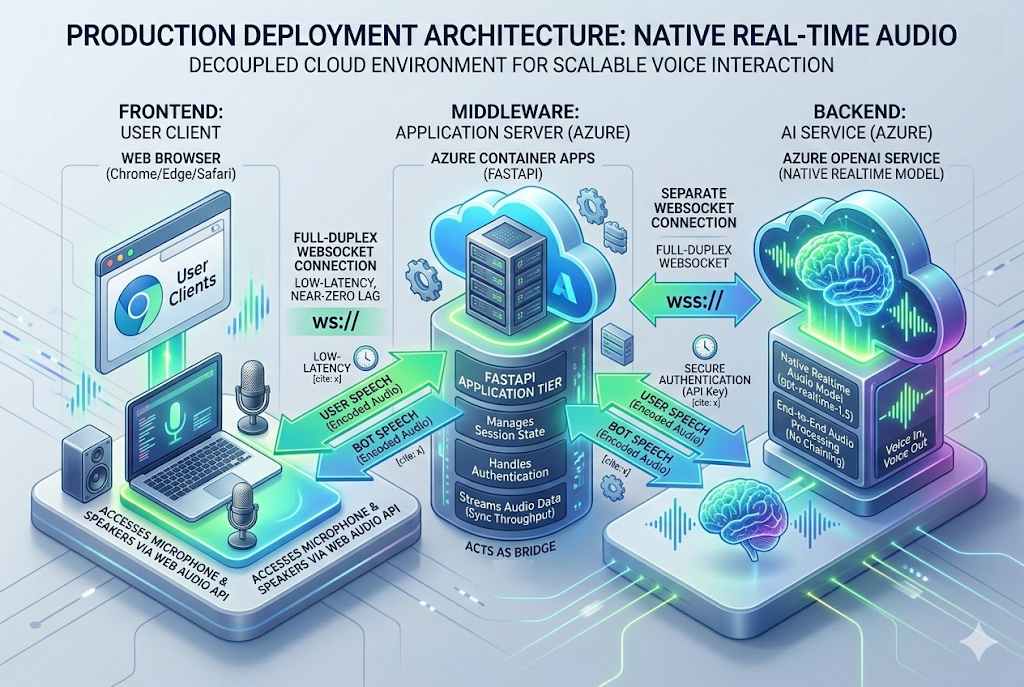
To move this into production on Azure, follow these architectural steps:
- Wrap in a FastAPI Server: Refactor your Python script to use FastAPI’s WebSocket implementation instead of local hardware audio capture. Your server will act as the middleman between the user’s browser and the Azure OpenAI endpoint.
- Containerize: Write a Dockerfile to package your FastAPI application.
- Deploy to Azure Container Apps (ACA): Push your container to an Azure Container Registry and deploy it via ACA. Container Apps natively support WebSocket connections, which is mandatory for the Realtime API to maintain the persistent duplex audio stream.
- Frontend Client: Build a simple web frontend using the native browser Web Audio API to capture the user’s microphone, encode it to Base64 or PCM16, and send it over a WebSocket to your FastAPI backend.
Conclusion
With the GA release of gpt-realtime-1.5, Microsoft Foundry delivers a highly reliable foundation for the next generation of voice applications. The era of stitching together laggy STT and TTS pipelines is coming to an end.
Check out the full code in my repository: 👉 Frezz146/talking-with-realtime-audio-llm
If you build your own implementations, run into issues, or want to contribute a PR, let me know in the comments!