From Edge to Enterprise Cloud: Part 3 — Cloud Migration and Enterprise Identity with Microsoft Foundry Agent Service
In our previous posts, From Edge to Enterprise-Cloud: Part 1: Building a Cost-Free Local Loop with Foundry Local and From Edge to Enterprise Cloud: Part 2: Tool Orchestration with the Model Context Protocol, we established an offline, hardware-accelerated local loop and evaluated tool-calling reliability across Small Language Models (SLMs). We proved that while compact models require strict schema hardening to avoid silent data corruption, running local stdio subprocesses over on-device engines delivers unmatched developer iteration speeds at zero token cost.
However, a local stdio loop is fundamentally bound to a single developer workstation. As your application matures from a local prototype into an enterprise microservice, out-of-process stdio pipes hit a hard operational ceiling. They cannot scale across distributed cloud nodes, they lack centralized governance and they risk secret sprawl if API keys are stored on local machines.
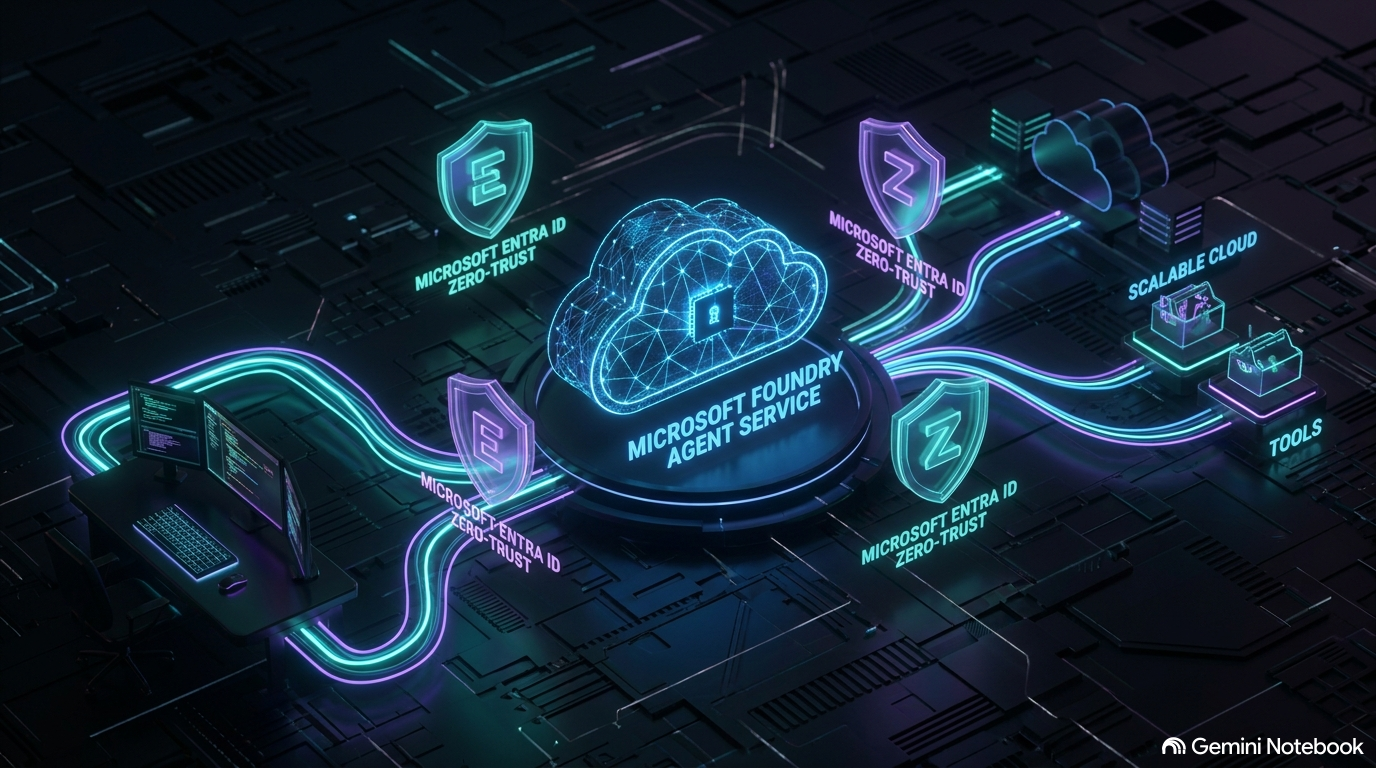
In this third installment, we bridge the gap between edge prototyping and enterprise cloud production. We will explore how to migrate your local agent workloads into the managed Microsoft Foundry Agent Service, automate infrastructure provisioning using Bicep, transition local stdio tools into cloud-native Foundry Toolboxes and enforce a Zero-Trust security model using Microsoft Entra ID.
The Enterprise Ceiling of Local Stdio Tools
During local development, spawning MCP servers as background stdio subprocesses (such as launching Node.js or Python scripts via npx or uvx) provides immediate feedback. But when moving to production, this pattern creates three major architectural bottlenecks:
- Process Lifecycle Sprawl: Managing background subprocesses across containerized microservices or serverless functions introduces severe stability and memory overhead
- Secret Sprawl and Key Management: Storing raw API keys or database connection strings on local workstations violates enterprise compliance standards
- Governance and Access Control: Local stdio pipes lack centralized auditing, role-based access control (RBAC) and unified token rate-limiting
To solve these challenges, we evolve our architecture. We retain the reasoning model and tool schemas established in Part 2, but delegate infrastructure management, secret storage and execution sandboxing to Azure.
Infrastructure as Code: Provisioning Microsoft Foundry with Bicep
Enterprise AI infrastructure should never be created through manual portal clicks. To ensure auditability, repeatability and seamless CI/CD integration, we define our entire cloud agent environment using Bicep (Azure’s native Infrastructure as Code language).
Under the current Microsoft Foundry resource model, Foundry projects run under Microsoft.CognitiveServices/accounts (kind AIServices) with /projects as a sub-resource. A single Cognitive Services account carries both the model deployment (gpt-5-mini) and the AI project, avoiding fragmented accounts.
Our Bicep template provisions four core resource blocks:
- Azure AI Account and Project (
Microsoft.CognitiveServices/accountsand/projects): The single resource hierarchy hosting our AI Project and endpoints - Model Deployment (
Microsoft.CognitiveServices/accounts/deployments): Provisioning our cloud reasoning model (gpt-5-miniunderGlobalStandard) - User-Assigned Managed Identity (
Microsoft.ManagedIdentity/userAssignedIdentities): A dedicated identity assigned specifically to our agent workload - Role Assignments (
Microsoft.Authorization/roleAssignments): Granular RBAC binding granting the identity theFoundry Userrole (Role ID53ca6127-db72-4b80-b1b0-d745d6d5456d), scoped directly to the project
📄 Bicep Infrastructure Template (part03-cloud-migration/infra/main.bicep)
// Provisions the Foundry resource this part's agent runs against: an AIServices
// account with project management enabled, one project, one model deployment,
// and a user-assigned managed identity with the "Foundry User" role.
//
// What this template deliberately does NOT create:
// - A Foundry Toolbox. There is no public Bicep/ARM resource type for one yet -
//   toolboxes are created through the (still-.beta) Foundry SDK. See
//   create_toolbox.py in this part, run once after this deployment.
// - A role assignment for your own developer identity. The auto-grant that
//   happens when you create a project through the Foundry portal UI does not
//   apply to CLI/Bicep deployments, so that is one az role assignment create
//   one-liner in this part's README, not infrastructure.

targetScope = 'resourceGroup'

@description('Azure region for all resources. Must support Foundry AIServices accounts and the chosen model.')
param location string = 'swedencentral'

@description('Prefix used to derive resource names. A uniqueness suffix is appended automatically.')
param namePrefix string = 'e2ecloud'

@description('Name of the Foundry project created on the account.')
param projectName string = 'part03-cloud-migration'

@description('Model to deploy: format/name/version as returned by az cognitiveservices account list-models.')
param modelFormat string = 'OpenAI'
param modelName string = 'gpt-5-mini'
param modelVersion string = '2025-08-07'

@description('GlobalStandard throughput capacity, in units of 1,000 TPM.')
param modelCapacity int = 10

var uniqueSuffix = uniqueString(resourceGroup().id, namePrefix)
var accountName = '${namePrefix}-${uniqueSuffix}'
var identityName = '${namePrefix}-agent-identity'

// Stable across the Azure AI User -> Foundry User rename (role IDs didn't change).
var foundryUserRoleId = '53ca6127-db72-4b80-b1b0-d745d6d5456d'

resource account 'Microsoft.CognitiveServices/accounts@2025-06-01' = {
  name: accountName
  location: location
  sku: { name: 'S0' }
  kind: 'AIServices'
  identity: { type: 'SystemAssigned' }
  properties: {
    allowProjectManagement: true
    customSubDomainName: accountName
    disableLocalAuth: false
    dynamicThrottlingEnabled: false
    publicNetworkAccess: 'Enabled'
    restrictOutboundNetworkAccess: false
  }
}

resource modelDeployment 'Microsoft.CognitiveServices/accounts/deployments@2025-06-01' = {
  parent: account
  name: modelName
  sku: { name: 'GlobalStandard', capacity: modelCapacity }
  properties: {
    model: { format: modelFormat, name: modelName, version: modelVersion }
  }
}

resource project 'Microsoft.CognitiveServices/accounts/projects@2025-06-01' = {
  parent: account
  name: projectName
  location: location
  identity: { type: 'SystemAssigned' }
  properties: {
    displayName: 'From Edge to Enterprise Cloud - Part 3'
    description: 'Hosted agent project for the cloud migration sample.'
  }
  dependsOn: [ modelDeployment ]
}

resource agentIdentity 'Microsoft.ManagedIdentity/userAssignedIdentities@2023-01-31' = {
  name: identityName
  location: location
}

// Scoped to the project (least privilege): lets the identity build and run
// agents in this project without granting access to every project on the account.
resource agentIdentityFoundryUser 'Microsoft.Authorization/roleAssignments@2022-04-01' = {
  name: guid(project.id, agentIdentity.id, foundryUserRoleId)
  scope: project
  properties: {
    roleDefinitionId: subscriptionResourceId('Microsoft.Authorization/roleDefinitions', foundryUserRoleId)
    principalId: agentIdentity.properties.principalId
    principalType: 'ServicePrincipal'
  }
}

output accountName string = account.name
output projectName string = project.name
output projectEndpoint string = 'https://${account.properties.customSubDomainName}.services.ai.azure.com/api/projects/${project.name}'
output modelDeploymentName string = modelDeployment.name
output agentIdentityClientId string = agentIdentity.properties.clientId
output agentIdentityPrincipalId string = agentIdentity.properties.principalId
output projectResourceId string = project.id
To deploy this environment to Azure, execute the following Azure CLI command:
az deployment group create \
  --resource-group rg-frezz-tech-agent-dev \
  --template-file infra/main.bicep \
  --parameters infra/main.bicepparam
Upon completion, the deployment outputs the exact project endpoint, account name and principal IDs required by our application:
accountName: e2ecloud-vh6aajpllyl4y
projectName: part03-cloud-migration
projectEndpoint: https://e2ecloud-vh6aajpllyl4y.services.ai.azure.com/api/projects/part03-cloud-migration
modelDeploymentName: gpt-5-mini
agentIdentityClientId: 26d5e706-9c28-4e5e-9054-bb95c8d3a980
agentIdentityPrincipalId: 31e06d07-bbff-4d6a-ad3c-0cc2eef169f9
Architecture Evolution: Local Stdio vs. Managed Foundry Toolboxes
When migrating tools to the cloud, local stdio subprocesses are replaced by Foundry Toolboxes. A Foundry Toolbox is a cloud-managed endpoint inside Microsoft Foundry that aggregates tools, web search capabilities, code interpreters and remote MCP servers behind a secured HTTPS interface.
Under the hood, a Toolbox call executes directly between your client application (laptop or CI runner) and the Toolbox endpoint over MCP, authenticated with the same Entra bearer token used for model inference. The Foundry project endpoint itself acts as the governance plane but is not involved in proxying raw tool traffic.
CAUTION: Local MCP toolboxes cannot currently be embedded directly into a published declarative
PromptAgentDefinition(client.agents.create_version(...)raisesValueError: Local MCP tool 'part03-tools' cannot be published as a prompt-agent tool).
Attempting server-side MCP registration (get_mcp_tool) requires a dedicated Foundry Connection resource. As a result, the Toolbox is registered and attached dynamically per call (agent.run(question, tools=[toolbox])) in code, keeping client orchestration lightweight and flexible.
Below is a direct comparison of how the architectural boundaries shift across execution tiers:
| Feature / Metric | Client Edge (Foundry Local) | Hybrid (Azure Local On-Premises) | Cloud Hosted (Foundry Agent Service) |
|---|---|---|---|
| Inference Location | On-device NPU, GPU or CPU | Arc-enabled Kubernetes cluster on Azure Local | Cloud-hosted Azure OpenAI deployments (gpt-5-mini) |
| Tool Transport Pipe | Out-of-process stdio pipes (stdin and stdout) | Containerized local network gRPC | Managed HTTPS endpoints with Server-Sent Events |
| Security Context | Local workstation user privileges | Local Active Directory with Arc sync | Microsoft Entra ID with granular project RBAC |
| Credential Storage | Local environment variables | Local secret store | Key Vault and managed connections |
| Best Suited For | Offline prototyping and low-latency edge | Disconnected IoT and strict data sovereignty | Enterprise SaaS, global scaling and governed AI |
Enterprise Identity and Zero-Trust with Microsoft Entra ID
Hardcoding API keys inside application settings or environment variables creates a massive attack surface. In an enterprise cloud deployment, we implement a Zero-Trust identity model using Microsoft Entra ID.
Instead of static authentication keys, our migration client utilizes DefaultAzureCredential from azure-identity. This unified credential handler automatically resolves identity tokens across different environments:
- Local Developer Machine: Authenticates using the developer’s Azure CLI credentials
- Production Cloud Environment: Automatically uses the User-Assigned Managed Identity provisioned by our Bicep template
By assigning the Foundry User role (53ca6127-db72-4b80-b1b0-d745d6d5456d) directly to the User-Assigned Managed Identity, every interaction with model endpoints and Toolboxes is explicitly authenticated, authorized and logged in Azure Audit Logs without embedding a single secret in our codebase.
Server-Side Agent Lifecycle and Persistent Conversations
In Part 1 and Part 2, our agent state lived purely in application memory. When the console app closed, the chat history vanished.
Microsoft Foundry Agent Service introduces a managed, server-side lifecycle that separates application orchestration from conversation state:
- Declarative Agent Versions (
client.agents.create_version): Agent instructions, model deployments and tool configurations are published as versioned, server-side definitions in Microsoft Foundry - Persistent Cloud Conversations (
agent.create_session): Conversation history is managed server-side. In Python (agent_framework),agent.create_session()creates a thread whose server-side ID is tracked insession.service_session_id. In C# (Microsoft.Agents.AI),agent.CreateSessionAsync()tracks this insession.ConversationId
CAUTION: Passing function tools to
FoundryAgentfails against the live service with a real SDK bug (additionalProperties: falseis missing from the generated schema):openai.BadRequestError: Error code: 400 – {‘error’: {‘message’: “Invalid schema for function ‘get_weather’: In context=(), ‘additionalProperties’ is required to be supplied and to be false.”, ‘type’: ‘invalid_request_error’, ‘param’: ‘tools[0].parameters’, ‘code’: ‘invalid_function_parameters’}}
agent_framework.foundry.FoundryAgent is the class the SDK’s own docstring calls “the recommended class for production use.” It connects to an already-published, named and versioned agent (agent_name/agent_version) rather than an in-process definition, making it the natural fit for a declarative, server-side lifecycle. However, FoundryAgent‘s tool-schema generator currently omits additionalProperties: false, which the strict-mode Responses API requires.
The generic Agent class wrapping FoundryChatClient, which cloud_agent.py actually runs, builds a schema that avoids this issue. Publishing a definition declaratively still works cleanly either way; it is specifically reconnecting to that published version through FoundryAgent for live execution that hits this preview limitation. For this reason, the runnable code in this part stays on Agent plus FoundryChatClient for the live conversation, while publishing the declarative definition as a separate, independently verified artifact.
Your host application only needs to store the lightweight session ID string in its local database, while Microsoft Foundry manages message persistence securely in the cloud.
Hands-On: Runnable Migration Code
The official companion repository, Frezz146/from-edge-to-enterprise-cloud, contains complete runnable migration projects under the part03-cloud-migration folder.
In Python, the local orchestration relies on agent_framework.foundry (FoundryChatClient, FoundryToolbox, to_prompt_agent) and agent-framework-foundry-hosting for running the loop, while azure-ai-projects is used for the declarative publishing step (client.agents.create_version).
Use the collapsible accordions below to inspect the code locations for your preferred stack:
🐍 Python Migration Client (part03-cloud-migration/python/cloud_agent.py)
"""The same tool-calling agent from Part 2, now running on Foundry Agent Service's
Conversations-era Agent Framework stack instead of the Assistants-style
threads/runs API this part used before.
"""

import asyncio
import os

from agent_framework import Agent
from agent_framework.foundry import FoundryChatClient, FoundryToolbox, to_prompt_agent
from azure.ai.projects import AIProjectClient
from azure.identity import DefaultAzureCredential

AGENT_NAME = "from-edge-to-enterprise-agent"


def get_weather(location: str, unit: str = "celsius") -> str:
    """Get the current weather for a location.

    Args:
        location: The city or location to look up.
        unit: Temperature unit, either "celsius" or "fahrenheit".
    """
    temperature = 18 if unit == "celsius" else 64
    return f'{{"location": "{location}", "temperature": {temperature}, "unit": "{unit}", "condition": "Partly cloudy"}}'


def calculate(expression: str) -> str:
    """Evaluate a simple arithmetic expression, e.g. "42 * 17".

    Args:
        expression: An arithmetic expression using +, -, *, /, parentheses and numbers.
    """
    allowed = set("0123456789+-*/(). ")
    if not all(c in allowed for c in expression):
        return '{"error": "Invalid expression"}'
    try:
        return f'{{"expression": "{expression}", "result": {eval(expression)}}}'
    except Exception as exc:
        return f'{{"error": "{exc}"}}'


async def main() -> None:
    credential = DefaultAzureCredential()
    client = FoundryChatClient(credential=credential)

    # The toolbox is attached per call, not baked into the agent: the published,
    # declarative definition below stays limited to this agent's own function
    # tools - see the "Why this part's agent does not run through FoundryAgent"
    # section for why.
    agent = Agent(
        client=client,
        name=AGENT_NAME,
        instructions=(
            "You are a helpful assistant with access to tools. "
            "Use them when needed to answer questions accurately."
        ),
        tools=[get_weather, calculate],
    )

    async with FoundryToolbox(credential) as toolbox:
        # Server-managed conversation: the app only ever holds this opaque ID.
        session = agent.create_session()

        question = "What's the weather in Tokyo, and what is 42 * 17?"
        print(f"[User]: {question}")
        result = await agent.run(question, session=session)
        print(f"[{AGENT_NAME}]: {result.text}")
        print(f"Server-side conversation ID: {session.service_session_id}")

        follow_up = "Use your web search tool to find one recent Microsoft Foundry announcement."
        print(f"[User]: {follow_up}")
        result2 = await agent.run(follow_up, session=session, tools=[toolbox])
        print(f"[{AGENT_NAME}]: {result2.text}")

    # Declarative, versioned agent lifecycle: publish the same function-tool
    # definition this script just ran, independent of the per-call toolbox above.
    definition = to_prompt_agent(agent)
    project_client = AIProjectClient(
        endpoint=os.environ["FOUNDRY_PROJECT_ENDPOINT"],
        credential=credential,
    )
    version = project_client.agents.create_version(
        agent_name=AGENT_NAME,
        definition=definition,
        description="Part 3 cloud migration demo agent.",
    )
    print(f"Published agent definition: {version.id} (version {version.version})")


if __name__ == "__main__":
    asyncio.run(main())
⚡ C# / .NET Migration Client (part03-cloud-migration/csharp/cloud-agent/Program.cs)
// The C# counterpart to cloud_agent.py: create a hosted agent in Foundry Agent
// Service, run two turns on a server-managed conversation and print the
// responses. Microsoft.Agents.AI.AzureAI's AsAIAgent()/RunAsync() puts C# on the
// same Agent Framework surface as agent_framework.foundry in Python.

using System.ComponentModel;
using Azure.AI.Projects;
using Azure.Identity;
using Microsoft.Agents.AI;
using Microsoft.Extensions.AI;

var projectEndpoint = Environment.GetEnvironmentVariable("ProjectEndpoint")
    ?? throw new InvalidOperationException("ProjectEndpoint is not set.");
var modelDeploymentName = Environment.GetEnvironmentVariable("ModelDeploymentName")
    ?? throw new InvalidOperationException("ModelDeploymentName is not set.");

[Description("Get the current weather for a location.")]
static string GetWeather(
    [Description("The city or location to look up.")] string location,
    [Description("Temperature unit, either celsius or fahrenheit.")] string unit = "celsius")
{
    var temperature = unit == "celsius" ? 18 : 64;
    return $"{{\"location\": \"{location}\", \"temperature\": {temperature}, \"unit\": \"{unit}\", \"condition\": \"Partly cloudy\"}}";
}

[Description("Evaluate a simple arithmetic expression, e.g. \"42 * 17\".")]
static string Calculate(
    [Description("An arithmetic expression using +, -, *, / and numbers.")] string expression)
{
    var allowed = "0123456789+-*/(). ".ToHashSet();
    if (!expression.All(allowed.Contains))
    {
        return "{\"error\": \"Invalid expression\"}";
    }
    try
    {
        var result = new System.Data.DataTable().Compute(expression, null);
        return $"{{\"expression\": \"{expression}\", \"result\": {result}}}";
    }
    catch (Exception ex)
    {
        return $"{{\"error\": \"{ex.Message}\"}}";
    }
}

// Identity is the one thing that has no local equivalent: a local Foundry
// Local process never crossed an auth boundary, but every call here does.
AIProjectClient projectClient = new(new Uri(projectEndpoint), new DefaultAzureCredential());

AIFunction[] tools = [AIFunctionFactory.Create(GetWeather), AIFunctionFactory.Create(Calculate)];

AIAgent agent = projectClient.AsAIAgent(
    modelDeploymentName,
    name: "from-edge-to-enterprise-agent",
    instructions: "You are a helpful assistant with access to tools. Use them when needed to answer questions accurately.",
    tools: tools);

// Server-managed conversation: the app only ever holds this opaque ID.
ChatClientAgentSession session = (ChatClientAgentSession)await agent.CreateSessionAsync();

const string question = "What's the weather in Tokyo, and what is 42 * 17?";
Console.WriteLine($"[User]: {question}");
AgentResponse response = await agent.RunAsync(question, session);
Console.WriteLine($"[{agent.Name}]: {response.Text}");
Console.WriteLine($"Server-side conversation ID: {session.ConversationId}");

const string followUp = "What was the second thing I just asked you to calculate?";
Console.WriteLine($"[User]: {followUp}");
AgentResponse response2 = await agent.RunAsync(followUp, session);
Console.WriteLine($"[{agent.Name}]: {response2.Text}");
Architecture Visual and Real Execution Trace
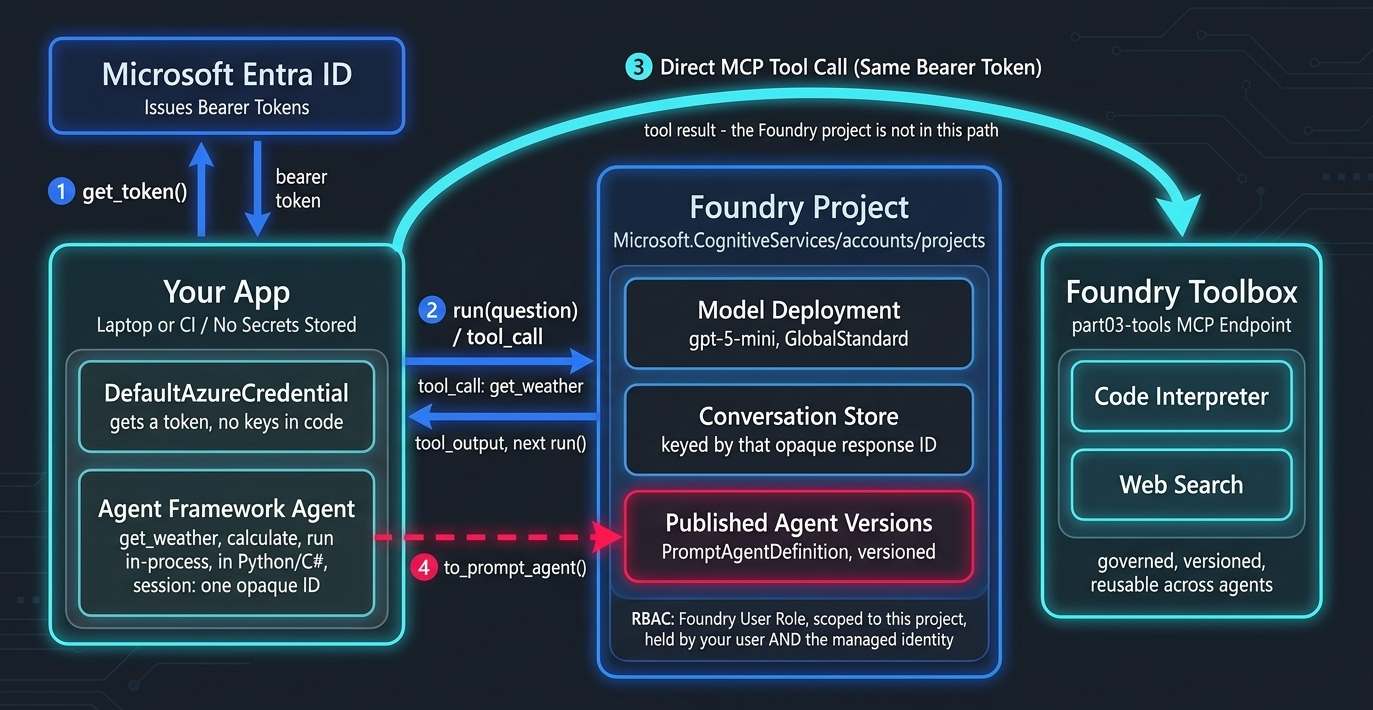
To visualize the complete cloud migration flow, the diagram below illustrates how client requests flow through Microsoft Entra ID authentication into the Microsoft Foundry Agent Service and out to managed Toolboxes:
When running the Python cloud migration script (cloud_agent.py), the interaction with Microsoft Foundry and Entra ID is captured in real time:
Similarly, running the C# migration client (Program.cs) produces an equivalent execution trace over the same server-side session thread:
The Strategic Bridge to Part 4: GenAIOps and Automated Evals
We have successfully migrated our agent from a single-machine local stdio loop into a secure, scalable enterprise cloud architecture powered by Bicep and Microsoft Entra ID.
However, moving to the cloud introduces a new operational challenge: How do we continuously measure and guarantee agent quality in production?
When updating system prompts, upgrading model deployments or modifying toolbox schemas, how do we prevent subtle regressions or silent hallucinations?
In Part 4 of our series, “GenAIOps, Automated Evaluations and Observability,” we will build a complete production quality control pipeline. We will implement automated evaluation gates using azure-ai-evaluation (GroundednessEvaluator, ToolCallAccuracyEvaluator), set up GitHub Actions CI/CD test suites against Golden Datasets and configure distributed OpenTelemetry tracing across our hybrid agent infrastructure.
Stay tuned and happy cloud coding!