From Edge to Enterprise-Cloud: Part 1 — Building a Cost-Free Local Loop with Foundry Local
In the fast-evolving landscape of Generative AI, developers are facing a silent productivity killer: feedback loop latency and unbudgeted cloud API costs. When building AI-driven agents, every tweak to a prompt, every revision of a system instruction and every validation of a tool-calling sequence requires running a new inference. When done exclusively in the cloud, these thousands of daily micro-iterations generate substantial per-token costs and add noticeable WAN routing latency to your workflow.
Back in February 2026, we explored the first hands-on impressions and architectural fundamentals in our post, Microsoft Foundry Local Public Preview: Architecture, Components and First Hands-on Experience. Since then, Microsoft Foundry Local has reached General Availability (GA), transforming from an exciting preview into a robust, production-grade local inference engine.
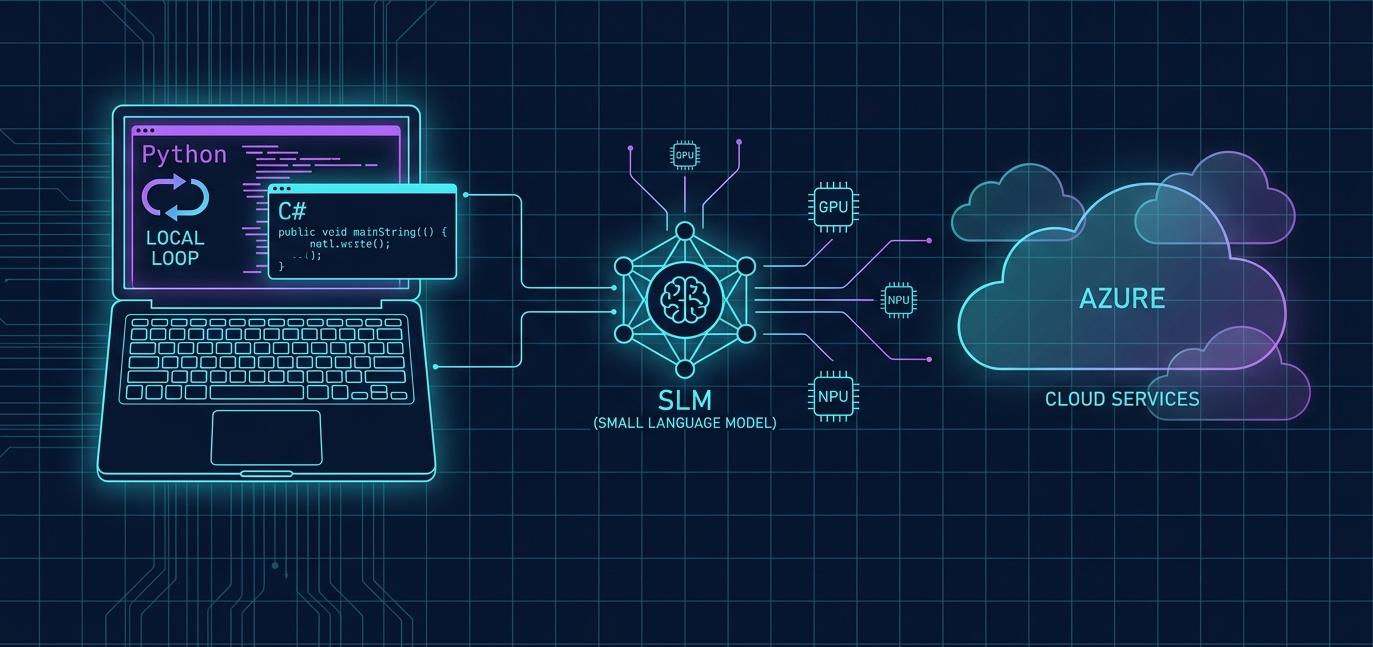
In this first installment of our four-part series, “From Edge to Enterprise Cloud”, we will explore how to set up a completely offline, hardware-accelerated local loop using Foundry Local. We will establish a system prerequisite baseline, dive into the mathematics of local benchmarking and build a fully functional, offline inference loop. You can find the complete, production-ready code in our official GitHub repository: Frezz146/from-edge-to-enterprise-cloud.
Why Local-First Development?
The goal of a local loop is simple: instant feedback at zero marginal cost.
Traditional agent development relies on cloud endpoints. This introduces a multi-second round-trip delay for network serialization, queue management and model processing. With Foundry Local, the model is embedded directly in your application’s process space. By executing Small Language Models (SLMs) like the Phi or Qwen families on your local workstation’s hardware (GPU or NPU), you gain:
- Zero Cloud Costs: Once the model is cached, you can run millions of inferences without paying a single cent in token fees
- Extreme Low Latency: Sub-30ms Time to First Token (TTFT), eliminating network latency entirely
- Privacy and Sovereignty: Your code, prompts and training contexts stay 100% on your local machine
Understanding the In-Process Architecture
Unlike other local inference options like Ollama or Llama.cpp servers that run as external background daemons, Microsoft Foundry Local utilizes an in-process architecture.
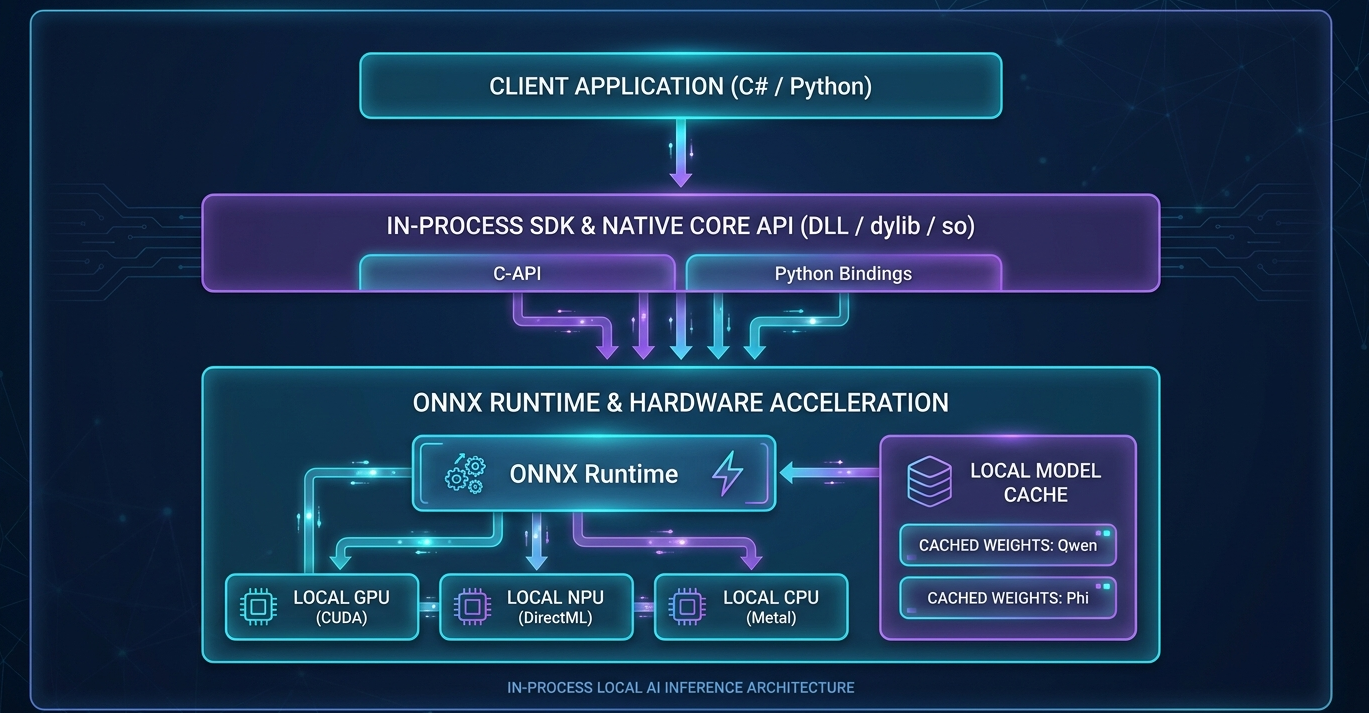
The runtime loads a native platform-specific library (.dll on Windows, .dylib on macOS and .so on Linux) directly into your application’s process space. It utilizes ONNX Runtime for highly optimized model graph execution and automatically handles hardware detection, choosing the best Execution Provider (EP) for your machine.
Hardware Requirements & SDK Flavors
To achieve hardware-accelerated inference locally, your developer machine must meet certain baseline specifications. Below is the system prerequisite matrix matching local prototyping environments with production edge deployments:
| System Component | Prototyping (Developer Hardware) | Edge Production Profile |
|---|---|---|
| Operating System | Windows 11 Version 24H2 (Build 26100+) or macOS Apple Silicon | Windows Server 2025 (fully updated) or Linux x86_64 |
| Processor (CPU) | 4 to 8 physical cores | 8 to 16 physical cores |
| System Memory (RAM) | 8 GB to 16 GB | 32 GB to 64 GB (minimizes host overhead) |
| Storage (Disk) | Standard SATA SSD | NVMe SSD (PCIe 3.0/4.0) for rapid cache loading |
| Acceleration (GPU/NPU) | DirectX 12-capable GPU or Apple Silicon GPU | NVIDIA RTX 2000+, Intel NPU or Qualcomm Snapdragon |
| Virtualization | Hyper-V VM (with nested virtualization enabled) | Hyper-V with Discrete Device Assignment (GPU Passthrough) |
Choosing Your SDK Flavor
When setting up your environment, Microsoft provides two distinct packages on package managers like PyPI or NuGet:
- Standard SDK (
foundry-local-sdk): The cross-platform option targeting Windows, macOS (Apple Silicon via WebGPU/Metal) and Linux. It compiles and bundles native execution providers internally. - WinML SDK (
foundry-local-sdk-winml): Dedicated exclusively to Windows 11. It integrates directly with the OS machine learning platform (Windows ML) and registers hardware drivers natively through DirectX 12, offering optimal performance on NPUs and modern consumer GPUs.
Caution: Do not install both in the same environment, as they share conflicting binary dependencies! Use virtual environments (
venvorconda) to keep your environments clean.
Benchmarking: Local vs. Cloud Inference
To objectively prove the advantage of your local loop, we can measure two primary key performance indicators (KPIs):
- Time to First Token (TTFT): The time elapsed between sending the request and receiving the very first response token.
TTFT = t_first_token - t_request - Tokens Per Second (TPS): The speed of generation once the model begins outputting tokens.
TPS = N_generated / (t_total - t_ttft)
Here is how local execution of a Small Language Model (SLM) compares directly to a high-end Cloud Frontier model:
| Metric / Feature | Local SLM (e.g., Phi-3.5-mini on Local GPU) | Cloud Frontier (e.g., Azure OpenAI GPT-4o) |
|---|---|---|
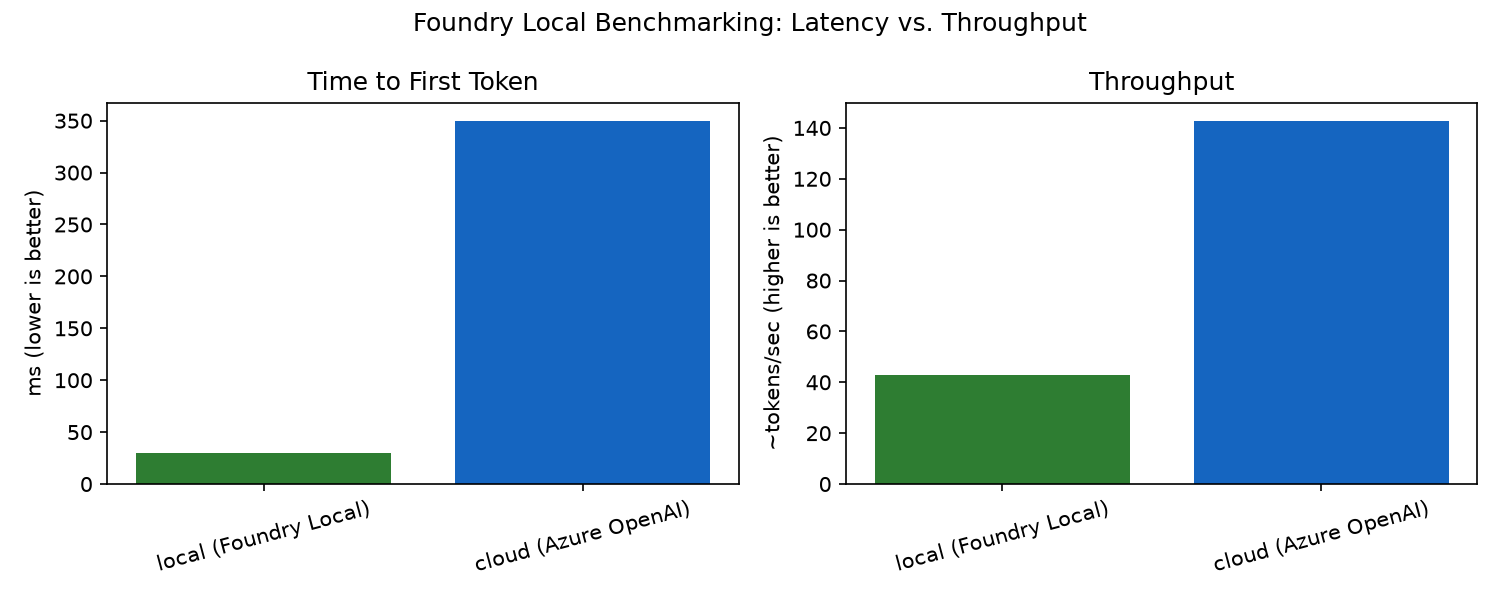
| Inference Latency (TTFT) | Extremely Low (< 30 ms to 50 ms) No WAN network round-trip overhead. | Moderate (150 ms to 600 ms) Subject to internet routing and queue delay. |
| Token Throughput (TPS) | 40 to 90 TPS Starkly dependent on local GPU/NPU specs. | 150+ TPS Elastically scaled on Microsoft’s cloud infrastructure. |
| Tool-Calling Latency | Low for local operations; climbs if calling remote APIs. | Highly variable; bundles WAN latency of both inference and tool execution. |
| Cost Structure | 100% Free after initial hardware acquisition. | Pay-per-Token model scaling linearly with request volume. |
To visualize this latency-to-throughput trade-off, here is a benchmarking chart showing the raw numbers side-by-side:
Hands-On: Implementing In-Process Local Inference
Now let’s build our local feedback loop. Since Microsoft’s Foundry Local SDK natively wraps its platform-specific native runtime with language-specific SDKs, it supports development in Python and C# (.NET).
All the code blocks below, along with the required dependency files, are available in the part01-local-development folder of our official GitHub repository: Frezz146/from-edge-to-enterprise-cloud.
Below is the complete, production-ready, in-process streaming implementation for both ecosystems. Use these collapsible tab views to copy the direct implementation matching your development stack. These views render as native interactive accordions on WordPress or any standard web portal:
🐍 Python (using foundry-local-sdk on PyPI)
Install the SDK via pip (choose foundry-local-sdk or foundry-local-sdk-winml for Windows-native hardware acceleration):
pip install foundry-local-sdkCopy the following sample code and run it locally:
from foundry_local_sdk import Configuration, FoundryLocalManager

MODEL_ALIAS = "qwen2.5-0.5b"
APP_NAME = "frezz_tech_edge_agent"


def download_and_register_eps(manager: FoundryLocalManager) -> None:
    """Discover local hardware accelerators (NPU/GPU/CPU) and pull the
    matching ONNX Runtime execution providers into the local cache."""
    current_ep = ""

    def ep_progress(ep_name: str, percent: float) -> None:
        nonlocal current_ep
        if ep_name != current_ep:
            if current_ep:
                print()
            current_ep = ep_name
        print(f"\r  {ep_name:<30}  {percent:5.1f}%", end="", flush=True)

    print("[Hardware] Discovering and registering execution providers...")
    manager.download_and_register_eps(progress_callback=ep_progress)
    if current_ep:
        print()


def run_local_loop() -> None:
    # 1. Initialize the singleton runtime for this process.
    config = Configuration(app_name=APP_NAME)
    print("[System] Initializing in-process Foundry Local runtime...")
    FoundryLocalManager.initialize(config)
    manager = FoundryLocalManager.instance

    download_and_register_eps(manager)

    # 2. Resolve the model alias to a hardware-optimized variant and cache it.
    model = manager.catalog.get_model(MODEL_ALIAS)
    print(f"\n[Model] Preparing resources for '{MODEL_ALIAS}'...")
    if not model.is_cached:
        print(f"[Model] Downloading '{MODEL_ALIAS}' weights from the cloud-hosted catalog...")
        model.download(
            lambda progress: print(
                f"\rDownload Progress: {progress:.1f}%", end="", flush=True
            )
        )
        print()
    else:
        print("[Model] Found cached weights. Skipping download.")

    # 3. Load the model into memory (allocates VRAM/RAM, builds the runtime session).
    print("[Model] Loading model into memory...")
    model.load()

    # 4. Get a native chat client and run a streaming completion in-process.
    client = model.get_chat_client()
    # Enforce deterministic output so repeated runs are directly comparable.
    client.settings.temperature = 0.0
    client.settings.max_tokens = 256

    messages = [
        {
            "role": "user",
            "content": "Describe the advantages of developer-local AI models in three bullets.",
        }
    ]

    print(f"\n[User]: {messages[0]['content']}\n")
    print("[Assistant]: ", end="", flush=True)
    for chunk in client.complete_streaming_chat(messages):
        if not chunk.choices:
            continue
        content = chunk.choices[0].delta.content
        if content:
            print(content, end="", flush=True)
    print("\n")

    # 5. Graceful cleanup - free the loaded weights and runtime resources.
    print("[System] Unloading model and releasing system resources...")
    model.unload()
    print("[System] Local inference loop completed successfully.")


if __name__ == "__main__":
    run_local_loop()
⚡ C# / .NET (using Microsoft.AI.Foundry.Local on NuGet)
Install the C# NuGet packages (choose Microsoft.AI.Foundry.Local or Microsoft.AI.Foundry.Local.WinML for Windows-native hardware acceleration):
dotnet add package Microsoft.AI.Foundry.LocalCopy the following sample code and run it locally:
using Betalgo.Ranul.OpenAI.ObjectModels.RequestModels;
using Microsoft.AI.Foundry.Local;
using Microsoft.Extensions.Logging.Abstractions;

const string modelAlias = "qwen2.5-0.5b";
const string appName = "frezz_tech_edge_agent";
const string userPrompt = "Describe the advantages of developer-local AI models in three bullets.";

CancellationToken ct = CancellationToken.None;

// 1. Initialize the singleton runtime for this process.
Console.WriteLine("[System] Initializing in-process Foundry Local runtime...");
await FoundryLocalManager.CreateAsync(
    new Configuration { AppName = appName },
    NullLogger.Instance);

var manager = FoundryLocalManager.Instance;
try
{
    // 2. Discover and register hardware-specific execution providers (NPU/GPU/CPU).
    Console.WriteLine("\n[Hardware] Registering hardware-specific execution providers...");
    string currentEp = "";
    await manager.DownloadAndRegisterEpsAsync((epName, percent) =>
    {
        if (epName != currentEp)
        {
            if (currentEp != "") Console.WriteLine();
            currentEp = epName;
        }
        Console.Write($"\r  {epName,-30}  {percent,6:F1}%");
    });
    if (currentEp != "") Console.WriteLine();

    // 3. Resolve the model alias and cache the hardware-optimized variant.
    var catalog = await manager.GetCatalogAsync();
    var model = await catalog.GetModelAsync(modelAlias)
        ?? throw new InvalidOperationException($"Model '{modelAlias}' not found in the catalog.");

    Console.WriteLine($"\n[Model] Preparing resources for '{modelAlias}'...");
    if (!await model.IsCachedAsync())
    {
        Console.Write($"[Model] Downloading '{modelAlias}' weights from the cloud-hosted catalog...");
        await model.DownloadAsync(progress =>
            Console.Write($"\r[Model] Download Progress: {progress:F1}%"));
        Console.WriteLine();
    }
    else
    {
        Console.WriteLine("[Model] Found cached weights. Skipping download.");
    }

    // 4. Load the model into memory.
    Console.WriteLine("[Model] Loading model into memory...");
    await model.LoadAsync();

    // 5. Get a native chat client and run a streaming completion in-process.
    var chatClient = await model.GetChatClientAsync();
    // Enforce deterministic output so repeated runs are directly comparable.
    chatClient.Settings.Temperature = 0.0f;
    chatClient.Settings.MaxTokens = 256;

    List<ChatMessage> messages = new()
    {
        new ChatMessage { Role = "user", Content = userPrompt }
    };

    Console.WriteLine($"\n[User]: {userPrompt}\n");
    Console.Write("[Assistant]: ");
    await foreach (var chunk in chatClient.CompleteChatStreamingAsync(messages, ct))
    {
        Console.Write(chunk.Choices[0].Message.Content);
    }
    Console.WriteLine("\n");

    // 6. Graceful cleanup.
    Console.WriteLine("[System] Unloading model and releasing system resources...");
    await model.UnloadAsync();
    Console.WriteLine("[System] Local inference loop completed successfully.");
}
finally
{
    manager.Dispose();
}
Verifying Your Setup: The Console Output Trace
When you run the code in your preferred language, you will notice a series of logging diagnostics indicating that the entire lifecycle of model loading, memory allocation and execution is being performed directly within your application process.
Here is what a successful execution trace looks like in your terminal:
[System] Initializing in-process Foundry Local runtime...
[Hardware] Discovering and registering execution providers...
  WebGpuExecutionProvider         100.0%

[Model] Preparing resources for 'qwen2.5-0.5b'...
[Model] Found cached weights. Skipping download.
[Model] Loading model into memory...

[User]: Describe the advantages of developer-local AI models in three bullets.

[Assistant]: Certainly! Here are three bullet points that highlight the advantages of developing and deploying local AI models compared to cloud-based AI models:

1. **Real-time Processing**: Local AI models can process data in real-time, which is crucial for applications where speed and responsiveness are critical. This means developers can quickly generate insights based on user interactions or other real-time events.

2. **Customization and Flexibility**: Local AI models allow developers to tailor their models to specific needs and constraints. They can be customized to fit different business requirements, while also being able to scale up as needed without changing the underlying infrastructure.

3. **Data Security and Privacy**: Local AI models run directly on the device itself, providing an additional layer of security and privacy protection compared to cloud-based models. This ensures that sensitive data remains confidential and protected from unauthorized access.

By leveraging these features, developers can create more efficient, accurate, and scalable solutions that meet the unique needs of their applications.

[System] Unloading model and releasing system resources...
[System] Local inference loop completed successfully.
Observe the complete absence of any HTTP/REST network calls or cloud API handshakes. The model loading and compiling steps are exceptionally fast, and the assistant’s streaming response is output with virtually zero input lag (sub-30ms TTFT).
Next Steps: Moving up the Agentic Ladder
With your local loop established, you can now run as many prompt engineering iterations as you want without receiving an API bill or waiting on server latency.
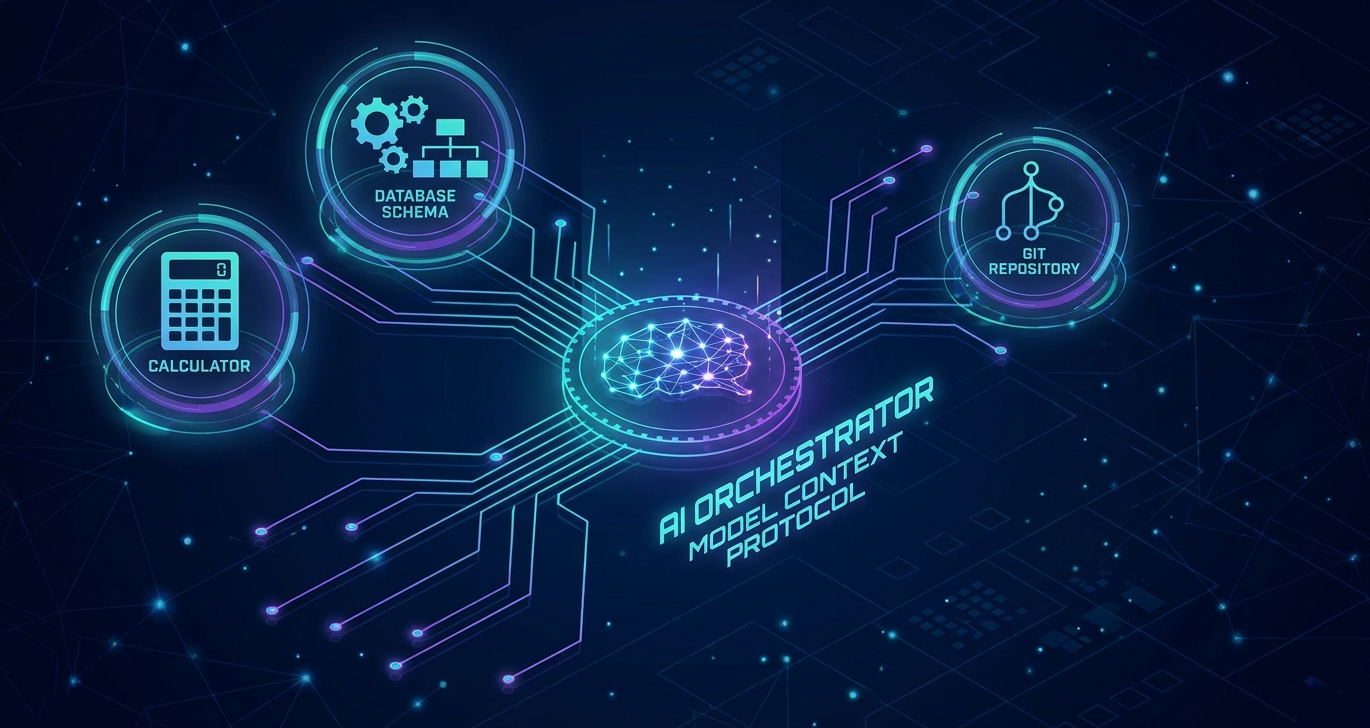
However, raw chat text completions are only the first stepping stone. In Part 2 of our series, we will take this local loop to the next level: Agentic AI. We will explore how to connect our offline models to external data streams and native operating system tools using the industry-standard Model Context Protocol (MCP), comparing the tool-calling reliability of small local models against massive cloud-hosted frontier models.
That comparison gets more interesting once the tool schemas do. Instead of just checking whether a call succeeds or fails, we’ll classify every tool call into an error taxonomy: wrong value, wrong type, rejected by the server, no valid call at all and run the same task through both a loosely typed schema and a hardened one (enums instead of free text, nested objects instead of flat strings, server-side validation). That gives us two answers that matter if you’re trying to ship tool-calling on a compact model:
- How much does a hardened schema actually help a small local model measured, not assumed?
- Does a better schema close the gap to a frontier model or does a gap remain that only more model size can close?
If you want to put real tool-calling in front of the local loop from this part, Part 2 gives you numbers instead of a hunch.
Stay tuned and happy offline coding!

[…] our first installment, From Edge to Enterprise-Cloud: Part 1: Building a Cost-Free Local Loop with Foundry Local, we established a completely offline, hardware-accelerated local loop using Microsoft Foundry […]
[…] our previous posts, From Edge to Enterprise-Cloud: Part 1: Building a Cost-Free Local Loop with Foundry Local and From Edge to Enterprise Cloud: Part 2: Tool Orchestration with the Model Context Protocol, we […]