Which Identity Does Your Foundry Agent Really Use?
Agent identity in Microsoft Foundry explained, including the part that is changing right now
Last verified against Microsoft Learn on 12 October 2026. Agent identity behavior in Foundry is evolving quickly, so check the linked docs before you rely on a detail.
- Every Foundry agent authenticates with a Microsoft Entra agent identity. It is a special kind of service principal, so you grant it roles like any other principal and no secret ends up in prompts or code.
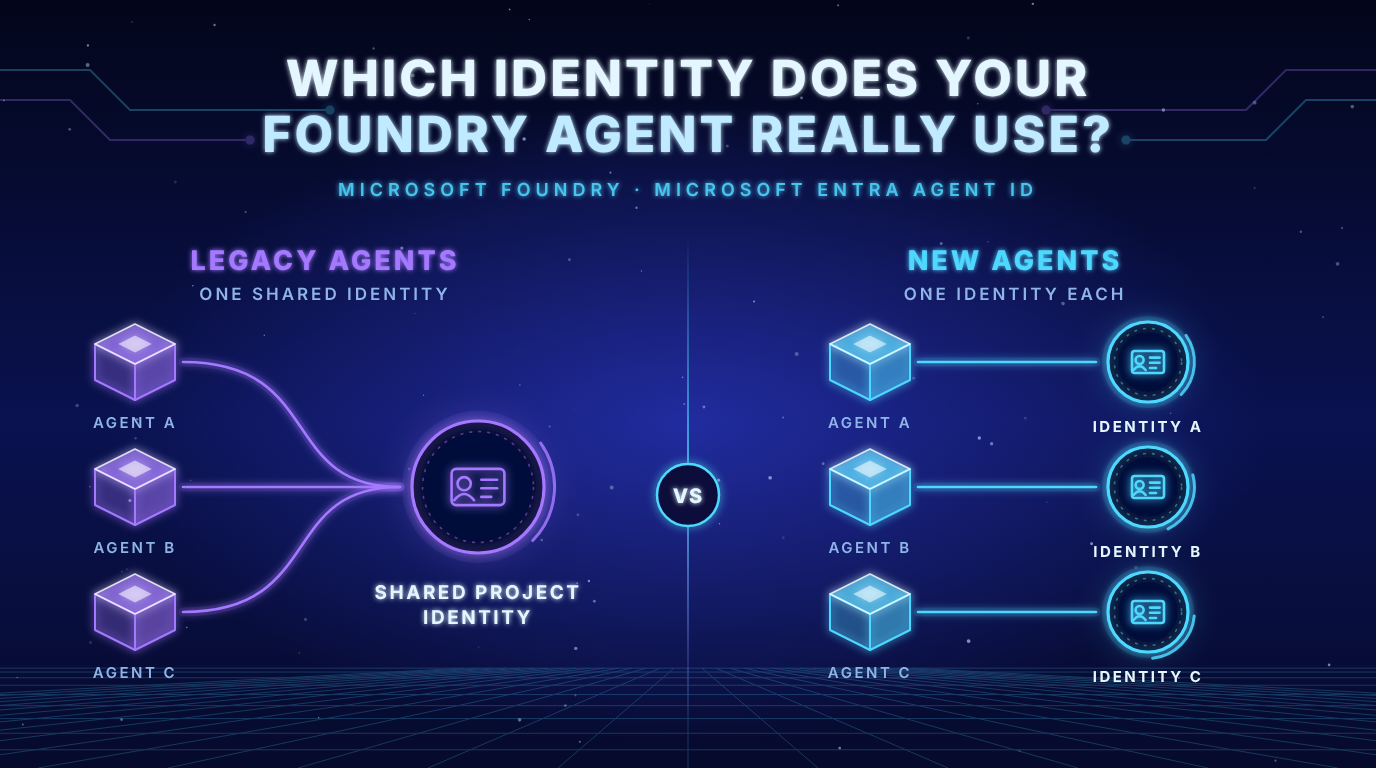
- Which identity an agent uses depends on its type. Legacy agents share one project identity. New agents get a unique identity the moment they are created.
- Roles do not follow an agent when you migrate. Reassign them or your tool calls fail.
The problem in plain language
An agent that calls tools behaves like a new employee with access to your systems. If every agent walks through the door with the same badge, your audit log cannot tell which agent did what and permissions become all or nothing.
Agent identities give each agent (or each class of agents) its own badge that security teams can inventory, restrict and revoke. Microsoft’s documentation lists the goals directly: separate agent actions from human and workload actions, give agents access that fits the job, keep them away from critical security roles and manage identities at the scale of agents that appear and disappear quickly (Agent identity concepts in Microsoft Foundry).
What is an agent identity and what is new compared to a service principal?
Microsoft Entra Agent ID introduces four new object types: the agent identity blueprint, the agent identity blueprint principal, the agent identity and the agent user (Governing agent identities).
Two of them matter for Foundry:
- The agent identity is a service principal in Entra ID that represents the agent at runtime.
- The agent identity blueprint is the reusable template for a whole class of agents. It is used for lifecycle operations and it holds the credentials that Foundry uses to request tokens.
Key insight: An agent identity is still a service principal, so authorization works the way you already know it. What is new is the layer above it. The blueprint lets you apply policies such as Conditional Access to every agent of one type. Sponsors give each agent an accountable human. The Entra admin center gives you one inventory of all agents in the tenant.
Foundry creates and manages these objects for you. For legacy agents it provisions one default blueprint and one default agent identity that the whole project shares. New agents get their own, as the section on the moving part explains.
How a tool call gets authenticated
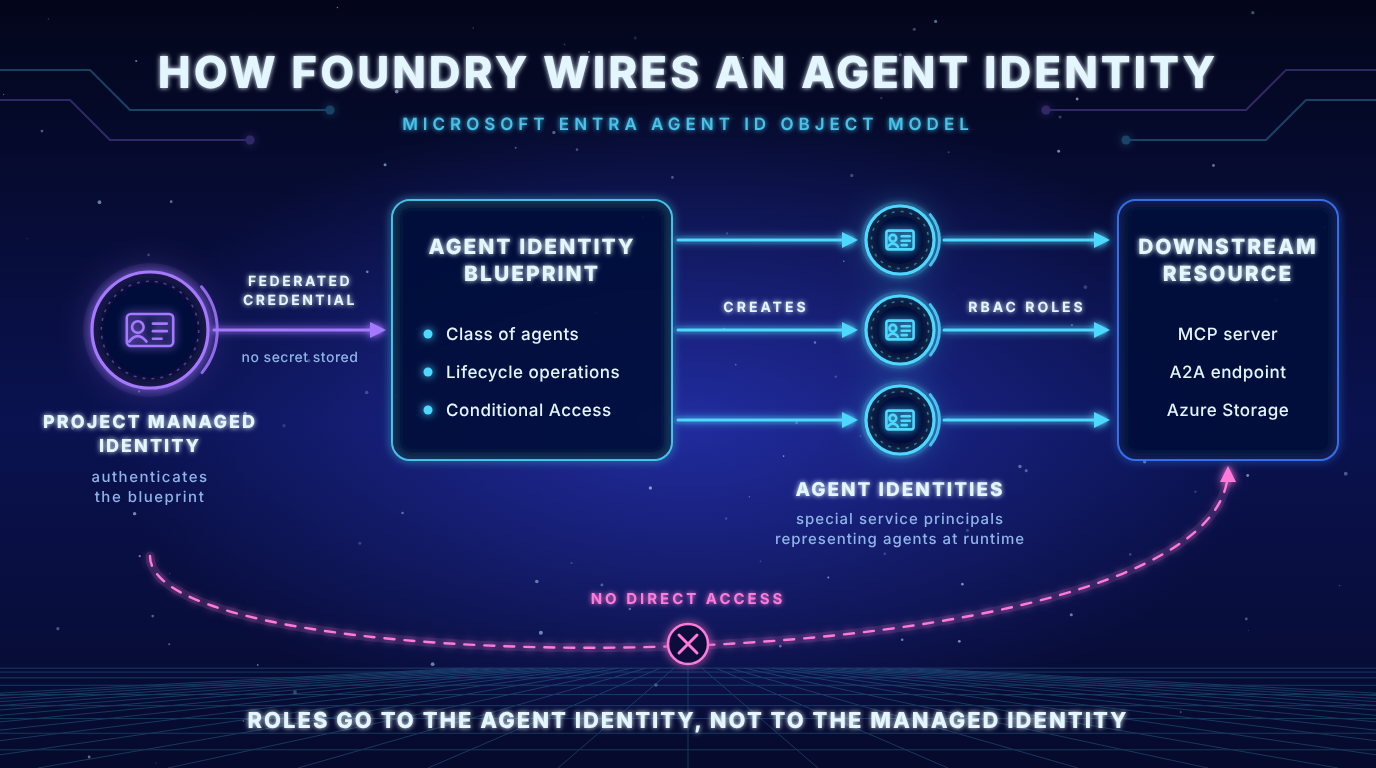
When an agent calls an MCP server or an Agent to Agent endpoint, Agent Service runs a token exchange in four stages (Agent identity concepts in Microsoft Foundry):
- Blueprint authentication: Agent Service proves to Entra ID that it may act for the blueprint
- Agent identity token: Entra ID issues a token for the specific agent identity
- Scoped token: Agent Service exchanges that token for an access token scoped to the audience of the downstream service
- Tool call: the scoped token goes to the MCP server or A2A endpoint, which checks the role assignments of the agent identity
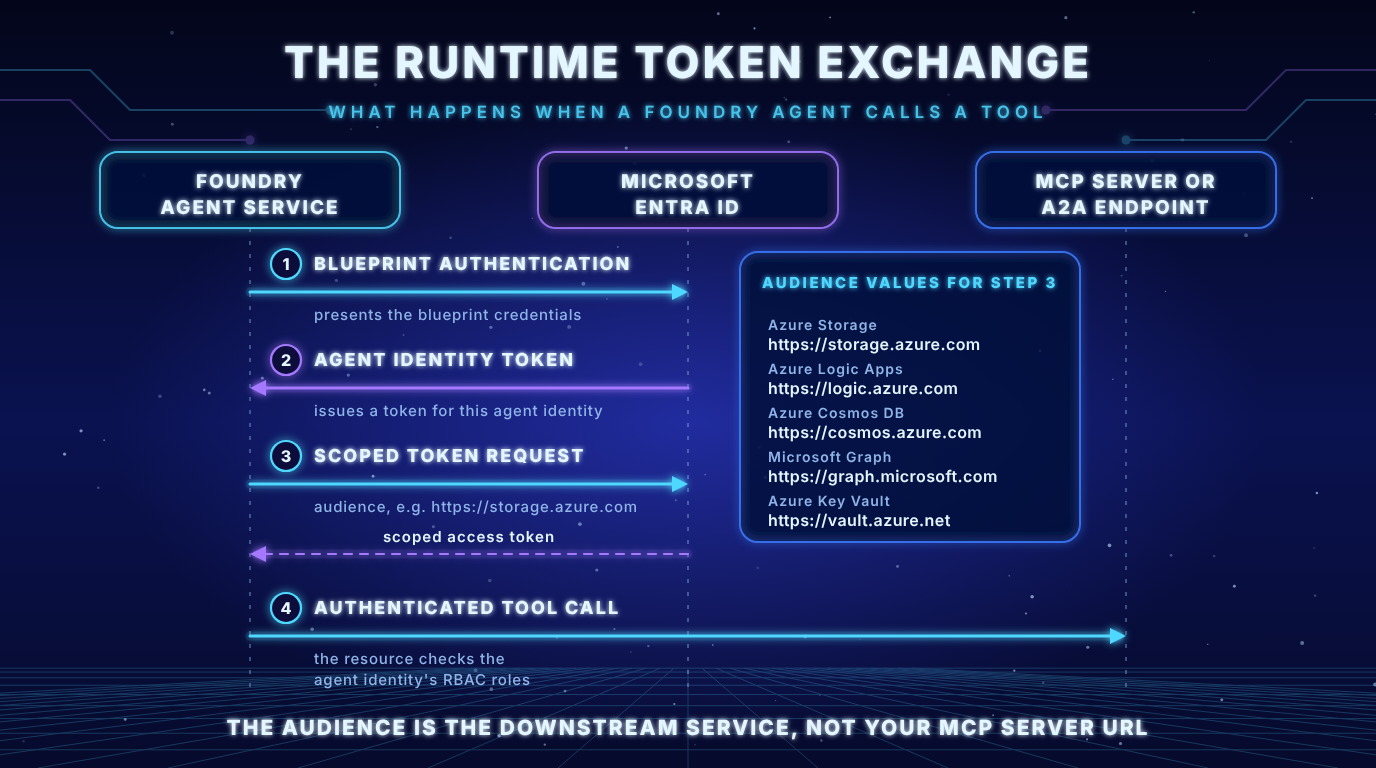
The blueprint does not use a stored secret in Foundry. It has a federated credential trust with the project’s managed identity, so Azure handles rotation. Microsoft marks federated credentials as the recommended option for production.
Key insight 1: The managed identity only authenticates the blueprint. It never touches the downstream resource. Role assignments belong to the agent identity, not to the managed identity.
Key insight 2: The audience in your tool connection must be the resource identifier of the downstream service (for Azure Storage that is
https://storage.azure.com). It is not the URL of your MCP server. A wrong audience produces authentication failures even when every role is assigned correctly.
The moving part: shared or unique identity?
Parts of the documentation describe this rule: agents in a project share one identity until you publish, and publishing creates a unique identity. That was true for the legacy publishing model. Microsoft has since changed the agent object model.
| Legacy agent | Published agent (legacy Agent Application) | New agent | |
|---|---|---|---|
| Identity | Shared project identity and blueprint | Own blueprint and identity bound to the Agent Application resource | Own blueprint and identity from the moment of creation |
| Endpoint | Project endpoint (backfilled with the new endpoint properties) | Stable endpoint of the application | Stable endpoint on the agent itself |
| Publish step | Creates an Agent Application | Already published | Not needed for the identity or the endpoint. Publishing now means distribution to Microsoft 365 and Teams |
Source: Migrate from agent applications to the new agent endpoint and publishing experience
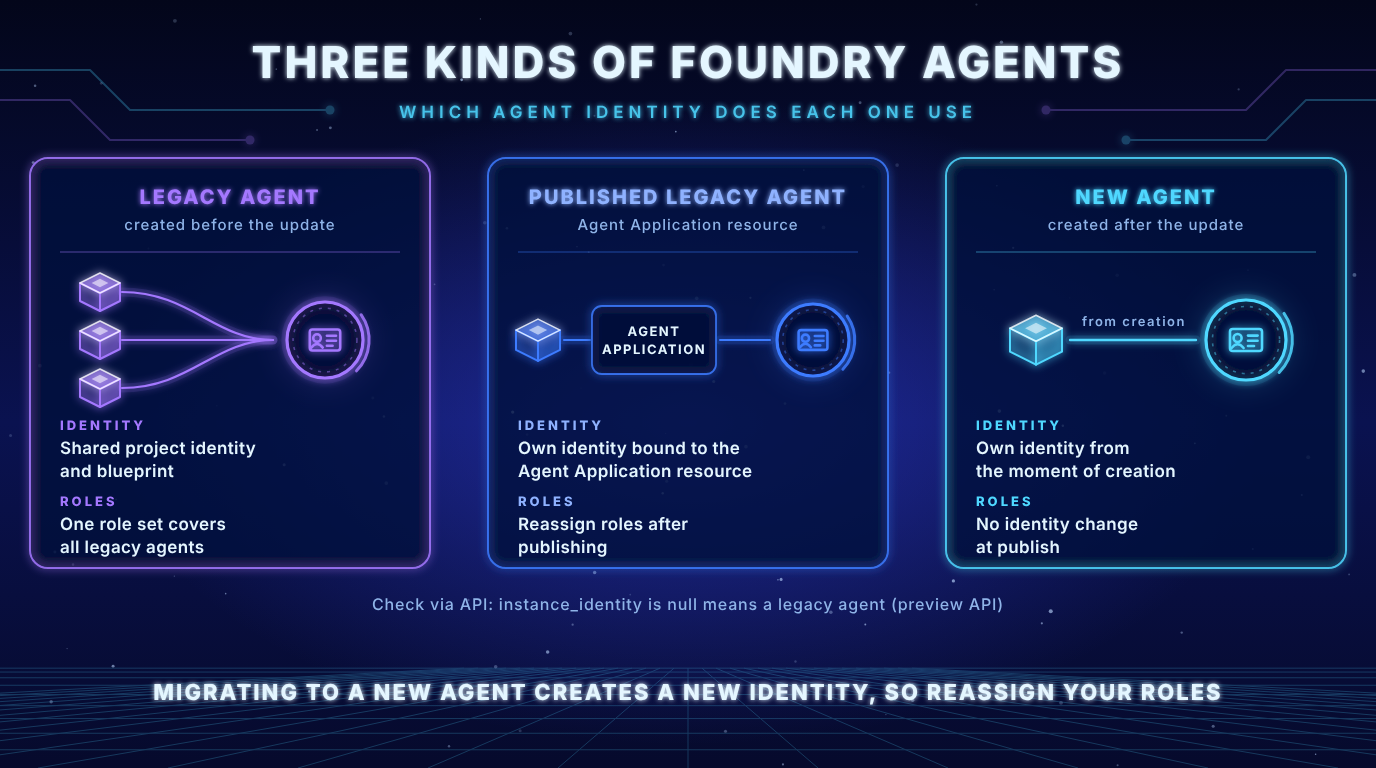
Key insight: The documentation is mid transition. The agent identity concepts page and the MCP authentication page still describe the shared identity before publishing and the unique identity after publishing. The concepts page carries a note that the publishing experience is changing, and the migration guide describes the new model. Do not trust the sentence you read. Check which type your agent is.
How to check what your agent uses
- API: According to the migration guide a legacy agent returns a null
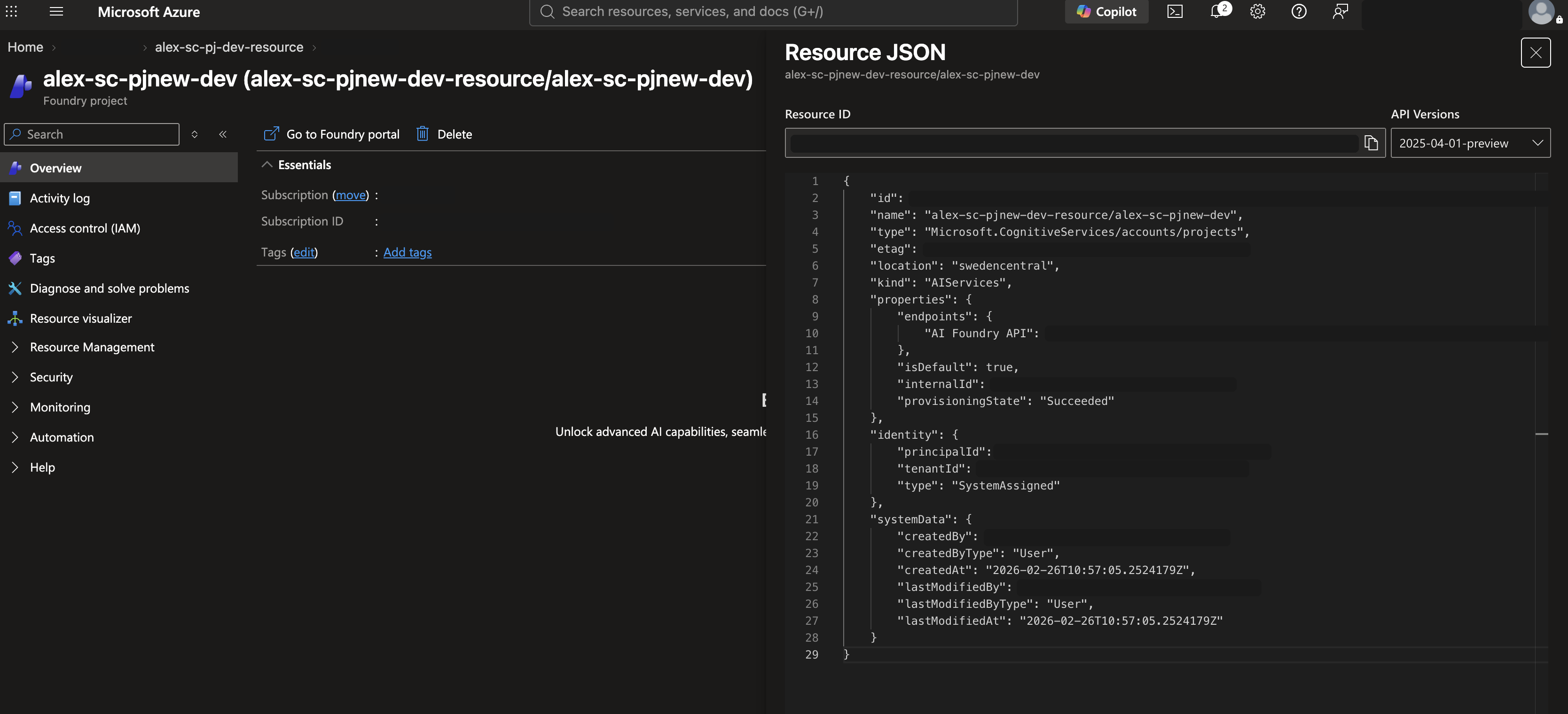
instance_identitywhen you read the agent through the preview API. The same page names the fieldagent.identityin its comparison table. Both mean the same thing, null is legacy. The call uses a preview API version, so verify the current version in the docs. - Azure portal: On the project Overview pane choose JSON View to find the shared blueprint and identity. For a published legacy agent do the same on the Agent Application resource. In my test project with API version 2025-04-01-preview this view shows the managed identity of the project but not the blueprint.
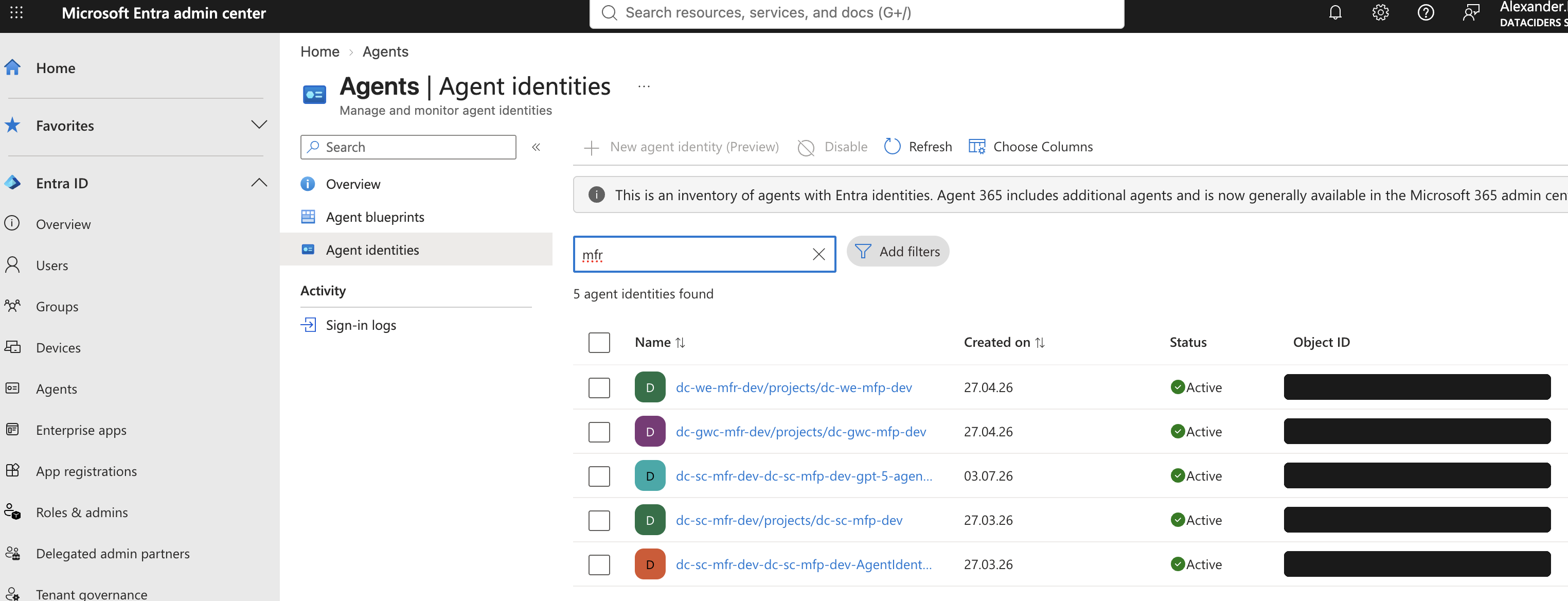
- Entra admin center: Entra ID > Agent ID > All agent identities lists every agent identity in the tenant, including Foundry agents and Copilot Studio agents.
What this means for your permissions
Key insight: There is currently no in place upgrade from a legacy agent to a unique identity. The migration guide tells you to create a new agent with the same definition. An in place path is listed as coming soon. The new agent gets a new identity, which differs from the shared project identity and from any Agent Application identity.
- Role assignments on the shared project identity do not carry over to a published or new agent.
- Role assignments for the identities of Agent Application resources do not transfer to the new agent object.
- Roles for clients that call your agent move from the Agent Application scope to the project scope in the new model.
Practical checklist
- Find the identity. Copy the agent identity ID from Entra.
- Grant the narrowest role at the narrowest scope. Microsoft prefers a resource or resource group over subscription wide access. The docs example for blob access looks like this:
az role assignment create \
    --assignee "<agentIdentityId>" \
    --role "Storage Blob Data Contributor" \
--scope "/subscriptions/<subscription-id>/resourceGroups/<resource-group>/providers/Microsoft.Storage/storageAccounts/<storage-account>"- Create the tool connection with agent identity authentication. The MCP authentication guide shows this command:
azd ai connection create my-mcp-connection \
  --kind remote-tool \
  --target https://<mcp-server-endpoint> \
  --auth-type agentic-identity \
--audience "<entra-audience>"- Reassign roles after every migration and remove the permissions that are no longer needed.
- Treat a shared identity as a larger blast radius. If an agent needs tighter control or separate auditing it needs its own identity.
- Pick the right method per MCP server. If all agents in a project may share the same access, the project managed identity is an alternative. If different agents need different access to the same server, use the agent identity.
Governance: what Entra adds on top
Foundry gives you the identity. Entra gives you the controls around it (Governing agent identities):
- Conditional Access can be applied at blueprint level, so all agent identities from one blueprint inherit the policy. It evaluates agent context and identity risk.
- Sponsors are human users accountable for the lifecycle and access of an agent identity. When a sponsor leaves the organization the sponsorship moves to their manager.
- Access packages can grant agent identities group memberships and API permissions or Entra roles. Assignments can expire and the sponsor is notified before that happens.
Key insight: These governance features have license requirements. Per the Entra documentation, Entra ID Governance for agent identities requires either Microsoft 365 E7 or a Microsoft Agent 365 license combined with at least Entra P1 or Microsoft 365 E3. Check your licensing before you promise these controls to your security team.
Where agent identity stops: the user
For MCP tools Foundry documents several authentication methods. The comparison table in the MCP guide shows one decisive difference (Set up MCP server authentication):
| Method | User context persists |
|---|---|
| Key based | No |
| Microsoft Entra, agent identity | No |
| Microsoft Entra, project managed identity | No |
| OAuth identity passthrough | Yes |
Key insight: The agent identity answers the question which agent is calling. It does not carry the identity of the user. If tool access must follow each user’s own permissions, the MCP guide points to OAuth identity passthrough. That method needs at least the Foundry Agent Consumer role for users on the project and the user’s tenant must match the project’s tenant.
Combining both questions, which agent and on behalf of which user, is the core of MCP governance. That is the topic of the next post.
Key takeaways
- An agent identity is a service principal with a governance layer (blueprint, sponsors, Conditional Access)
- Assign roles to the agent identity, never to the managed identity that only authenticates the blueprint
- The audience is the downstream service, not your MCP server URL
- Check whether your agent is legacy or new. Do not rely on the “shared until published” rule
- Migration creates a new identity. Plan the role reassignment
- Agent identity says which agent. For which user you need OAuth identity passthrough
Sources
- Agent identity concepts in Microsoft Foundry (Microsoft Learn)
- Migrate from agent applications to the new agent endpoint and publishing experience (Microsoft Learn)
- Set up authentication for Model Context Protocol (MCP) tools (Microsoft Learn)
- Governing agent identities (Microsoft Entra ID Governance, Microsoft Learn)