
Which Agent, on Whose Behalf? Authenticating MCP Tools in Microsoft Foundry
Four ways to authenticate an MCP tool in Foundry and the only one that keeps the user
Last verified against Microsoft Learn on 19 October 2026. Foundry changes quickly, so check the linked docs before you rely on a detail.
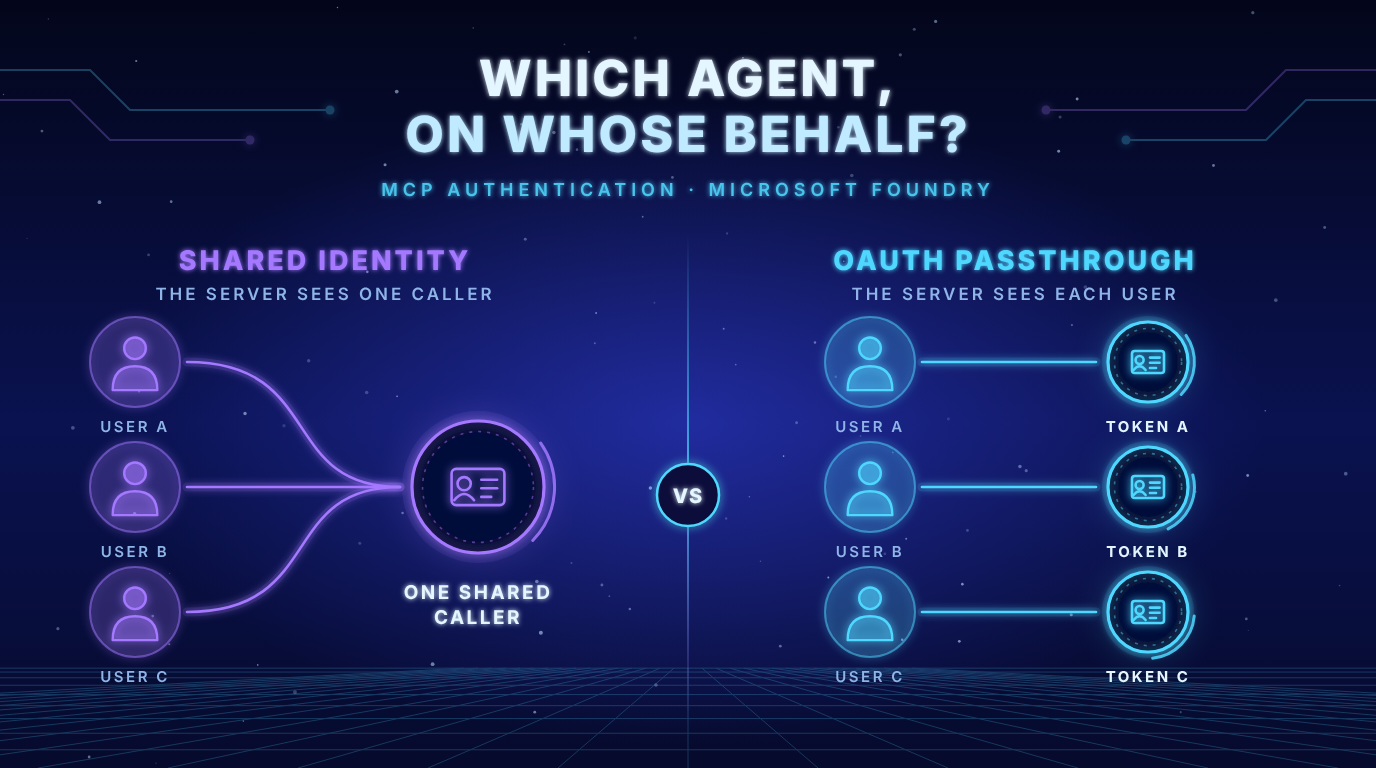
- Only OAuth identity passthrough keeps the user: Key based authentication, the agent identity and the project managed identity all give the MCP server one shared caller for every user.
- Start with Microsoft Entra authentication when the server supports it: The docs recommend it because it removes secret management and rotates tokens for you.
- Tokens with a Microsoft audience are blocked for custom MCP servers: With managed OAuth and Entra authentication you need your own app registration and an audience you control.
The problem in plain language
My last post answered which agent is calling a tool: every Foundry agent authenticates with a Microsoft Entra agent identity. That is only half of the story. A tool often needs to know whose request it is serving. A ticket agent should show each employee only the tickets that employee may see.
The Foundry docs split MCP authentication into two scenarios (Set up authentication for MCP tools):
- Shared authentication: all users use the same identity –> User context does not persist.
- Individual authentication: each user signs in with their own account –> User context persists.
The methods at a glance
| Method | What it is | User context persists |
|---|---|---|
| Key based | API key or access token | No |
| Microsoft Entra, agent identity | Agent identity with roles on the underlying service | No |
| Microsoft Entra, project managed identity | Project managed identity with roles on the underlying service | No |
| OAuth identity passthrough | Users sign in and authorize access | Yes |
A fifth option exists for servers that need no authentication at all. Read the terms of service and the rate limits of such a server anyway.
Key insight: The user is not lost by accident. Three of the four methods work by design with one identity for everyone. If your tool must apply the permissions of each user you have exactly one choice.
Shared identity: key, agent identity and managed identity
Key based: You store an API key or a personal access token in a project connection. Anyone with access to the project can read that key, so keep only shared secrets there.
Microsoft Entra with the agent identity or the project managed identity: No secret is involved. You assign roles to the identity on the underlying service and Foundry requests the token. The connection from the last post looks like this (source):
azd ai connection create my-mcp-connection \
  --kind remote-tool \
  --target https://<mcp-server-endpoint> \
  --auth-type agentic-identity \
  --audience "<entra-audience>"
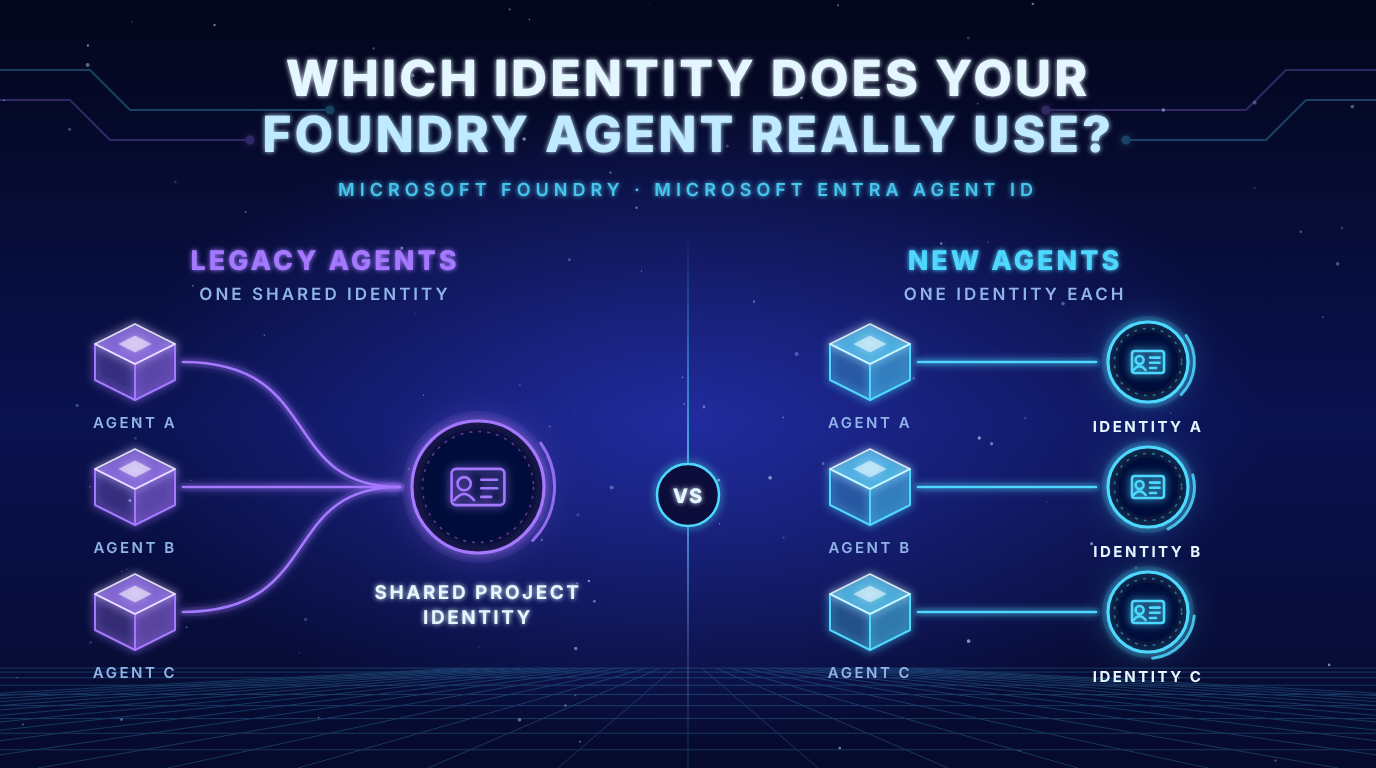
For the project managed identity you replace agentic-identity with project-managed-identity. Which one should you pick? If all agents in a project may share the same access the project managed identity is enough. If different agents need different access to the same server use the agent identity.
Key insight: The MCP authentication page still says that all agents in a project share one agent identity before publishing and that each agent gets its own after publishing. As my last post showed, that depends on the agent type. Check which type your agent is before you plan the role assignments.
Individual: OAuth identity passthrough
Here every user signs in once and the tool call runs with that user’s own token. The flow has four steps:
- A new user triggers a tool call for the first time. The response contains an
oauth_consent_requestitem with aconsent_link. Your app shows the link to the user. - The user signs in and consents.
- Your app sends another response with the
previous_response_idto continue. - From now on the user does not need to consent again.
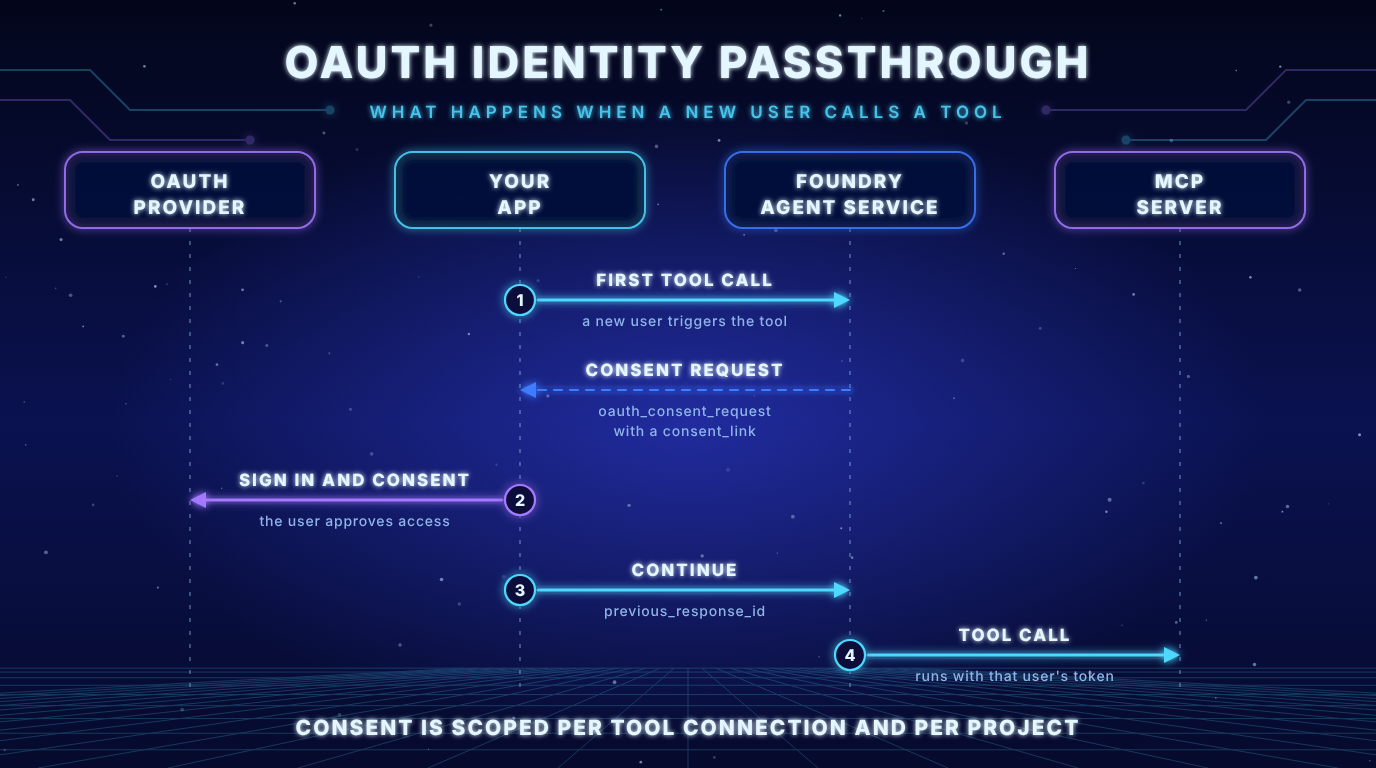
The first tool call of a new user returns a consent link. After that the tool call runs with the token of that user.
What you need:
- The user needs at least the Foundry Agent Consumer role on the project. Foundry User also works but is meant for developers.
- The tenant of the user must match the tenant of the project. Cross tenant token exchange is not supported.
- You can use managed OAuth or a custom OAuth app registration.
Consent is scoped per tool (connection) name per Foundry project. If the user declines the tool call fails and returns an error, so your app has to handle that case.
Key insight: The docs name the required role in two ways. One note says Foundry Agent Consumer or Foundry User. The troubleshooting table says Foundry User or higher. Verify the role in the portal before you publish. Older tutorials also use the former names. Foundry User was called Azure AI User. The role IDs and permissions did not change.
See it yourself: a server that tells you who is calling
Reading about tokens is one thing. I wanted to see the difference. So I built a small MCP server with one tool called whoami. It validates a real Microsoft Entra access token and reports what it sees in it: a user or only an application. The code is on GitHub: foundry-mcp-auth-whoami-demo.
I called it with the token of my own Azure CLI login. Identifiers are shortened by the server:
{
  "callerType": "user",
  "meaning": "A person is in the token. The server can apply that user's own permissions. This is what OAuth identity passthrough gives you.",
  "objectId": "421d1295...",
  "tenantId": "e481e30c...",
  "clientApp": "04b07795...",
  "userName": "a***@dataciders.com",
  "delegatedScopes": ["user_impersonation"],
  "audience": "https://management.azure.com",
  "issuer": "https://sts.windows.net/e481e30c.../",
  "expiresAt": "2026-10-19T23:57:34+00:00"
}
Then I called the same server with the token of a service principal. That is the same kind of token as the one an agent identity or a project managed identity presents: a workload and no person.
{
  "callerType": "application",
  "meaning": "No person in the token, only a workload identity. The server cannot tell which user triggered the call. This is the situation with Microsoft Entra authentication using the agent identity or the project managed identity, and with key based authentication.",
  "objectId": "d9f6448e...",
  "tenantId": "e44d86aa...",
  "clientApp": "efa7aa01...",
  "audience": "https://management.azure.com",
  "issuer": "https://sts.windows.net/e44d86aa.../",
  "expiresAt": "2026-10-20T22:15:11+00:00"
}
Key insight: For the server the difference is a few claims. A user token carries a person and delegated scopes. A workload token carries only the application. With a shared identity the server cannot tell your users apart however good its own authorization logic is.
Limits of the demo. It does not run inside Foundry. It shows what a server sees for the two kinds of token. For the local test it accepts the Azure Resource Manager audience, because az can issue that token without an app registration. Do not do that in production. Use your own API as the audience.
Common pitfalls
| Symptom | Likely cause | Fix |
|---|---|---|
Cannot pass Microsoft token to untrusted MCP endpoint. | With managed OAuth and Entra authentication Agent Service blocks Microsoft audience tokens for custom MCP servers | Use custom OAuth with your own app registration and an audience you control |
No oauth_consent_request appears | The tool is not configured for OAuth passthrough or was never invoked | Check the connection and make the prompt trigger the tool |
| Tool calls are blocked unexpectedly | require_approval defaults to always | Adjust require_approval |
Your session has expired. Please reauthenticate with the provided url. | Invalid refresh token or wrong refresh URL | Check the refresh URL and add offline_access to the scopes. Then let the user consent again |
Which method for which case?
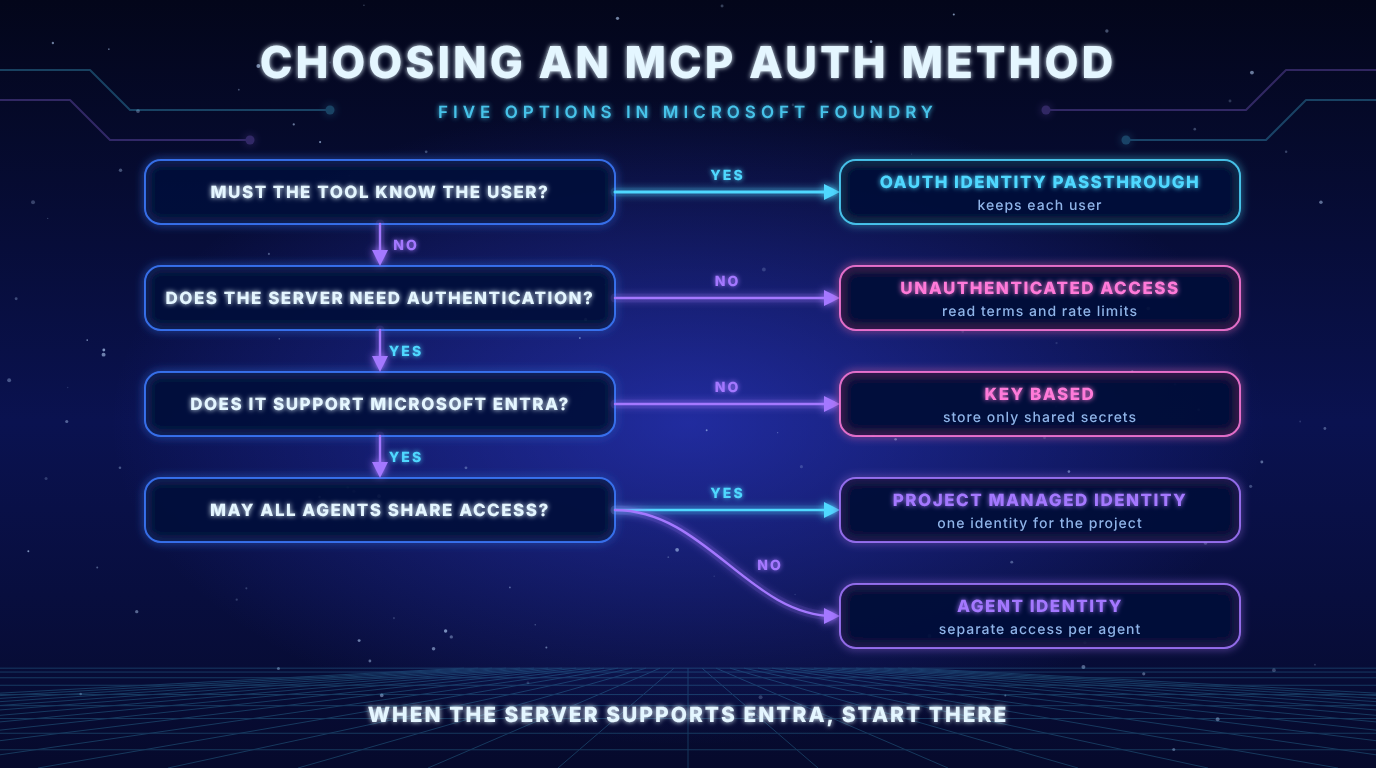
Start with the question whether the tool must know the user.
- The tool must apply the permissions of each user: use OAuth identity passthrough.
- The server needs no authentication: use unauthenticated access and read its terms.
- The server supports Microsoft Entra: use the project managed identity for shared access or the agent identity for per agent access.
- Anything else with one shared identity: use key based authentication and store only shared secrets.
Practical checklist
- Decide the question first. Does the tool need the user or only the agent?
- Create the connection with the matching
--auth-typeand the right audience. - Trigger a prompt that calls the MCP tool and confirm there are no authentication errors.
- For OAuth passthrough confirm that a new user gets a consent link. Confirm that later calls do not ask again and that a second user goes through their own consent.
- Handle the decline. A user who says no must not break your app.
Key takeaways
- The agent identity says which agent is calling. It does not carry the user.
- Only OAuth identity passthrough keeps the user context.
- Start with Microsoft Entra authentication when the server supports it.
- Key based secrets in a project connection are readable by every project member.
- Tokens with a Microsoft audience do not go to custom MCP servers. Bring your own app registration.
- Verify the required role. The docs name it in two ways.
In the next post I will host the whoami server on Azure Container Apps and protect it with Microsoft Entra, so that Foundry can call it as a real MCP tool.
Sources
- Set up authentication for Model Context Protocol (MCP) tools (Microsoft Learn)
- Agent identity concepts in Microsoft Foundry (Microsoft Learn)
- Which Identity Does Your Foundry Agent Really Use? (frezz-tech.de)
- foundry-mcp-auth-whoami-demo (GitHub)

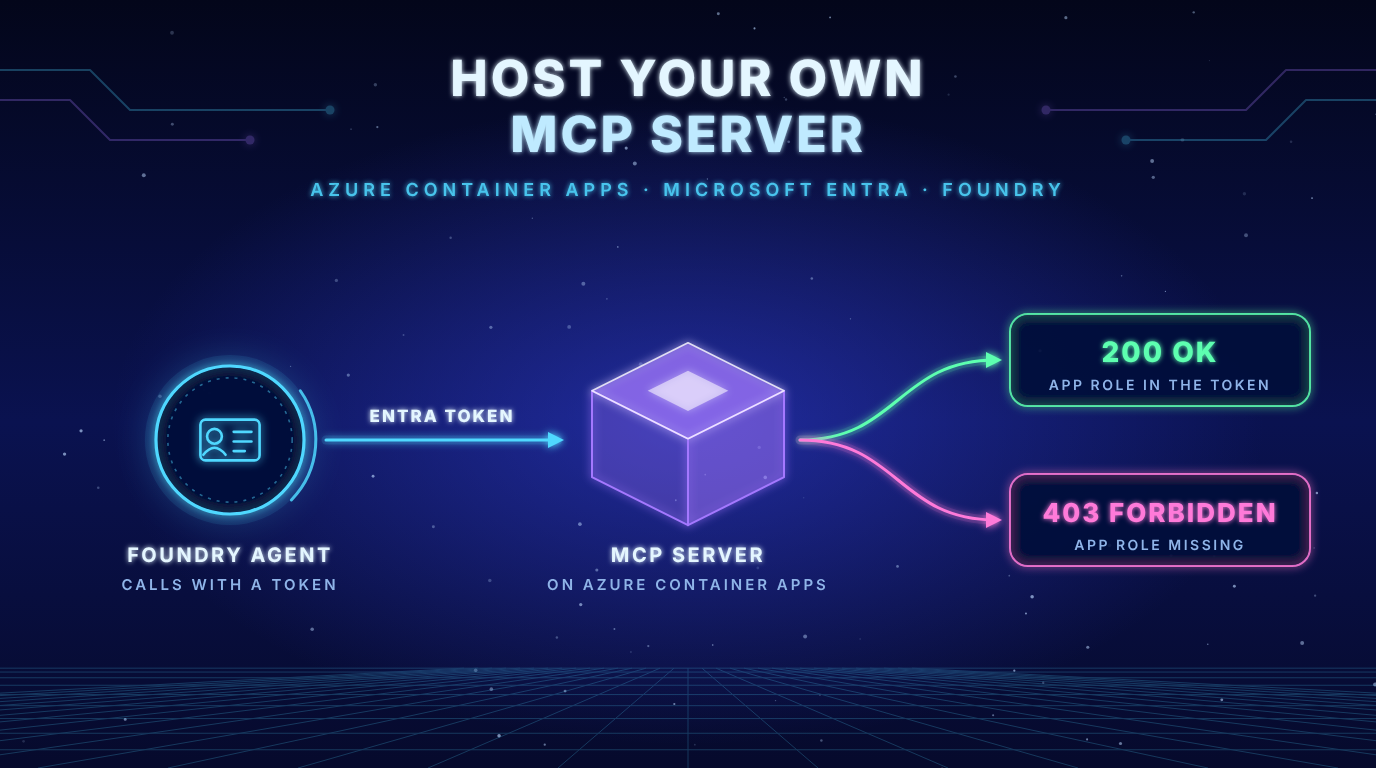
[…] my last post I built a small MCP server called whoami. It validates a real Microsoft Entra token and tells you […]