From Workload to Person: OAuth Identity Passthrough for Your Own MCP Server in Microsoft Foundry
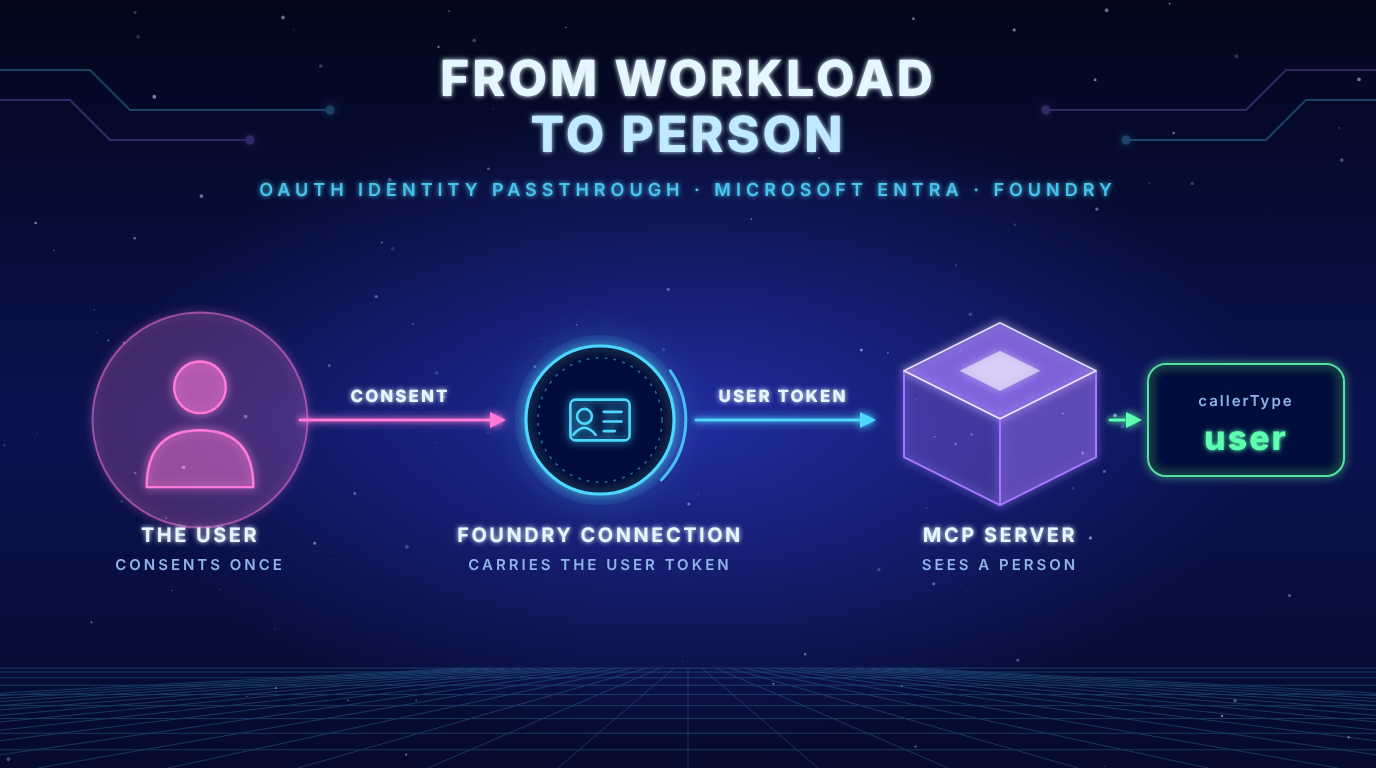
The same whoami server on Azure Container Apps, now with a signed in user in the token
Last verified against Microsoft Learn on 1 November 2026. Foundry changes quickly, so check the linked docs before you rely on a detail.
- The server finally sees a person: With OAuth identity passthrough the
whoamianswer changes fromapplicationtouser. The token carries a delegated scope and no app role. - The order of the setup matters: Foundry shows the redirect URL only after the connection exists. And an OAuth connection cannot be edited afterwards. A typo in the secret or the scopes means a new connection.
- The server check stays the same: My demo writes
scpandrolesinto one list. The sameREQUIRED_ROLEsetting now enforces a scope. No code change was needed for that.
The problem in plain language
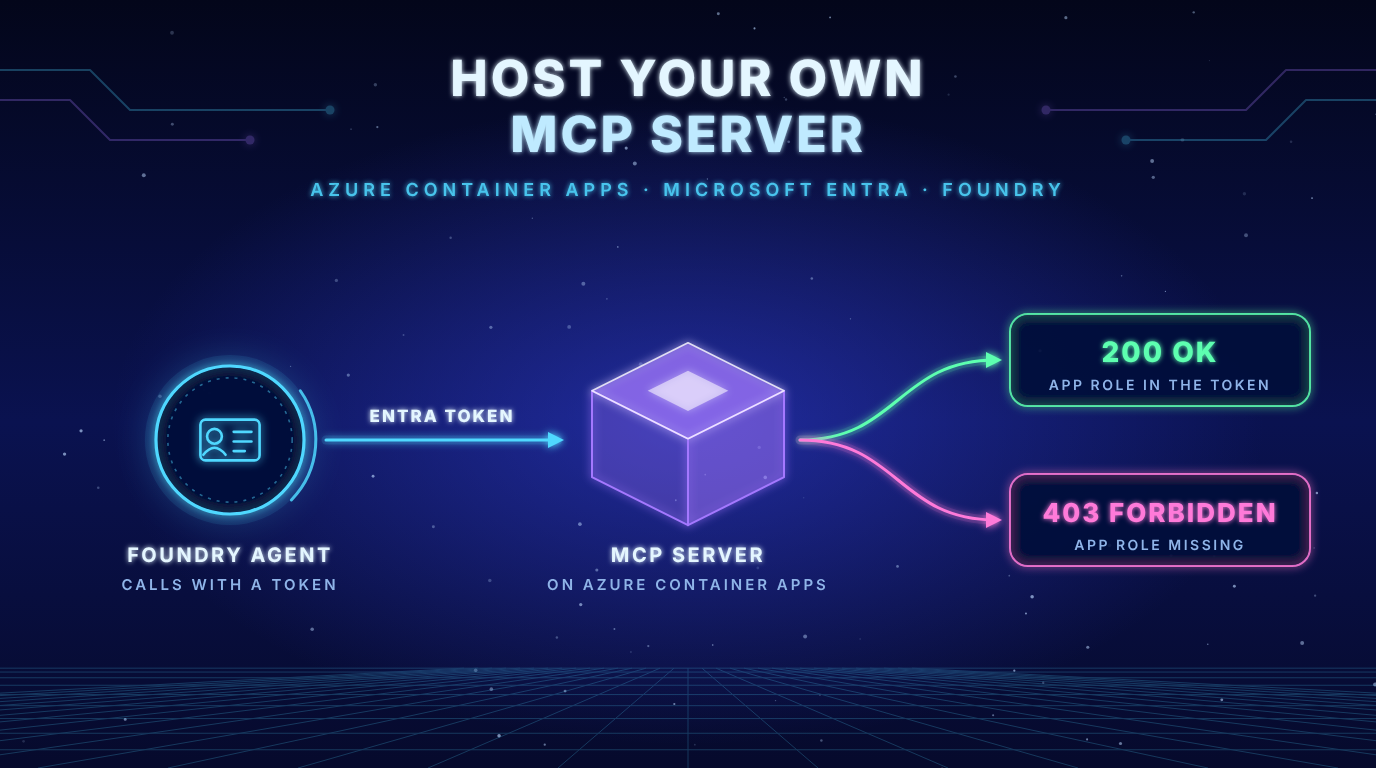
In my last post the whoami server ran on Azure Container Apps and a Foundry agent called it with a Microsoft Entra token. The answer was callerType: application. The server saw a workload (the project managed identity or the agent identity) and no person. That is fine for many tools. It is not enough when the tool must know who asked.
So this post adds the user. Foundry calls the same server with a token of the signed in person. For that you need your own OAuth client. Microsoft calls this custom OAuth. The managed variant is not an option for your own server: Agent Service blocks tokens for Microsoft audiences from going to custom MCP servers.
What the docs say
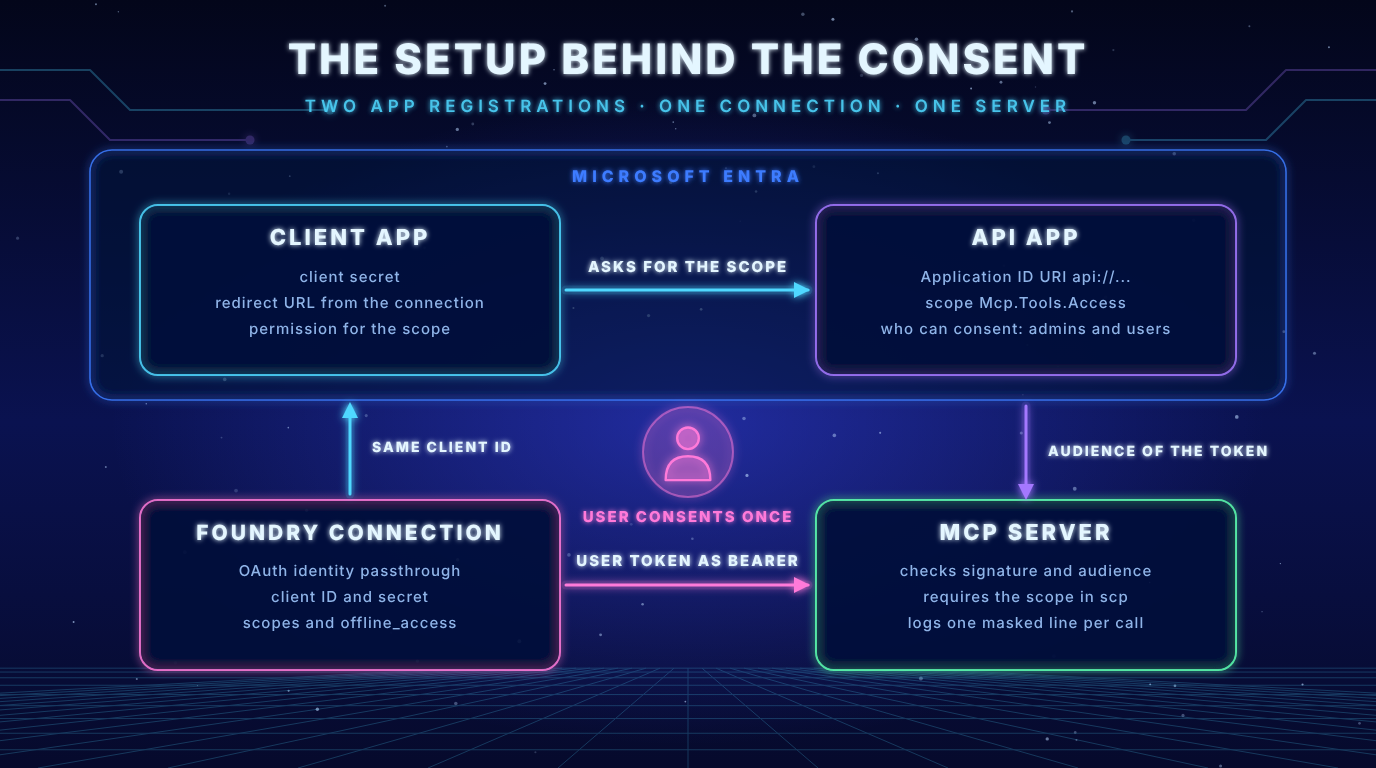
The docs describe the connection fields and the consent flow (Set up authentication for MCP tools).
| Field | Required | Note |
|---|---|---|
| Client ID | Yes | The app registration of your OAuth client |
| Client secret | Optional | Depends on your OAuth app |
| Auth URL | Yes | Entra authorize endpoint of your tenant |
| Token URL | Yes | Entra token endpoint of your tenant |
| Refresh URL | Yes | Without a separate refresh URL use the token URL |
| Scopes | Optional | Add offline_access for automatic refresh |
Three more points from the docs matter for what follows. Consent is stored per tool (connection) per project. The user needs at least the role Foundry Agent Consumer on the project. And the Entra tenant of the user must match the tenant of the project.
Key insight: In the Foundry portal the scopes are separated by a space. The page about the Azure Developer CLI says commas. The two docs contradict each other. I used spaces in the portal and it worked.
Step 1: Add a delegated scope to your API
The API from the last post only has an app role for workloads. For a signed in user it needs a delegated scope (Expose a web API). The scope value ends up in the scp claim:
az rest --method PATCH \
  --uri "https://graph.microsoft.com/v1.0/applications(appId='<api-app-id>')" \
  --headers "Content-Type=application/json" \
  --body @scope.json
{
  "api": {
    "oauth2PermissionScopes": [
      {
        "adminConsentDescription": "Allows the app to call the whoami MCP tool on behalf of the signed in user.",
        "adminConsentDisplayName": "Call whoami MCP tool as user",
        "id": "<new guid>",
        "isEnabled": true,
        "type": "User",
        "userConsentDescription": "Allows the app to call the whoami MCP tool on your behalf.",
        "userConsentDisplayName": "Call whoami MCP tool as you",
        "value": "Mcp.Tools.Access"
      }
    ]
  }
}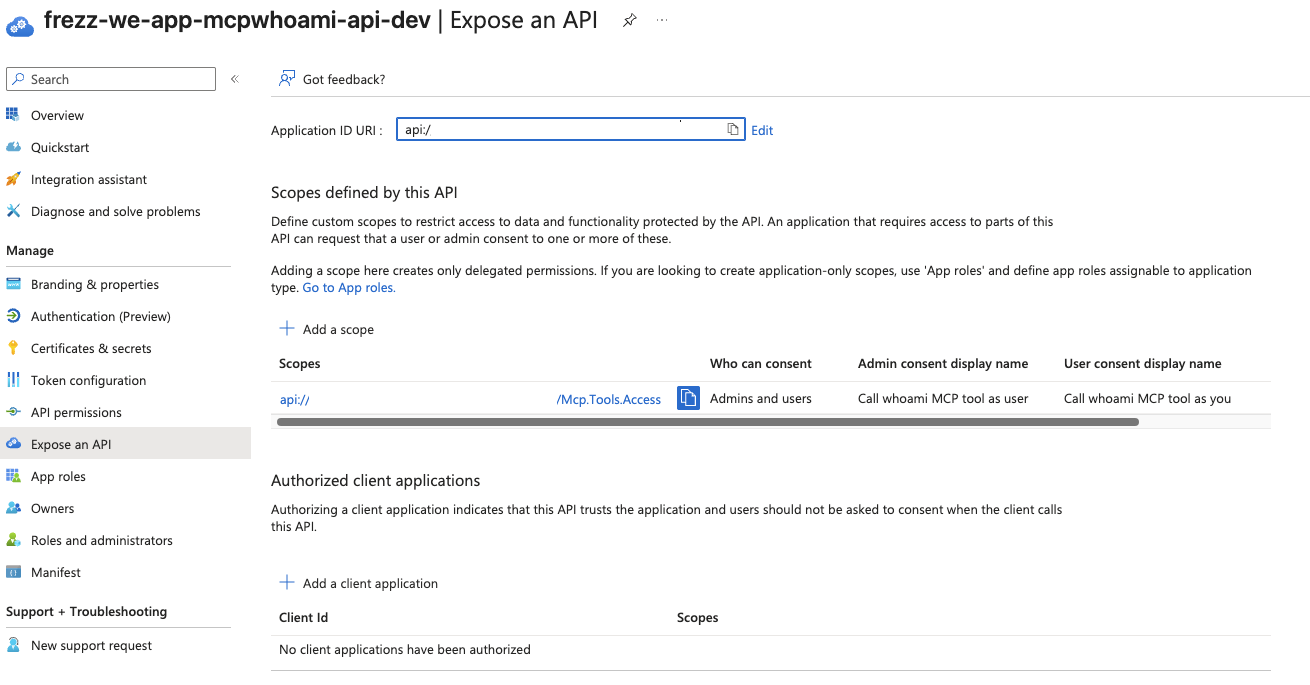
The type User means that users can consent themselves. I first tried az ad app update --set api.oauth2PermissionScopes=@file. It failed with Couldn't find 'api' in '' and I did not look for the reason. The call to Microsoft Graph worked right away.
Step 2: Create the client app registration
The client is the app that signs in the user. It holds the secret and later the redirect URL.
az ad app create --display-name <client-name> --sign-in-audience AzureADMyOrg --query appId -o tsv
az ad sp create --id <client-app-id>
az ad app permission add --id <client-app-id> --api <api-app-id> --api-permissions <scope-id>=Scope
az ad app credential reset --id <client-app-id> --display-name foundry-oauth --years 1 --query password -o tsv
The secret appears only once. Keep it out of your repo and out of files that the repo could pick up.
After permission add the CLI prints a hint to run az ad app permission grant. I did not. That command grants consent for everyone and the user would never see a consent dialog. Because the scope allows “Admins and users” the user can consent at the first call. If your tenant blocks user consent an admin has to grant it.
Step 3: Create the connection in the portal
In the Foundry portal go to Build, Tools, Connect a tool, Custom, Model Context Protocol. Select OAuth Identity Passthrough.
| Field | Value |
|---|---|
| Name | whoami-mcp-oauth |
| Remote MCP Server endpoint | https://<your-app>/mcp |
| Client ID | The client app ID |
| Client secret | The secret from step 2 |
| Auth URL | https://login.microsoftonline.com/<tenant-id>/oauth2/v2.0/authorize |
| Token URL | https://login.microsoftonline.com/<tenant-id>/oauth2/v2.0/token |
| Refresh URL | The same as the token URL |
| Scopes | api://<api-app-id>/Mcp.Tools.Access offline_access |
After saving Foundry shows a redirect URL. For me it pointed to the consent service of Azure API Connections (global.consent.azure-apim.net/redirect/...) and not to my Container App.
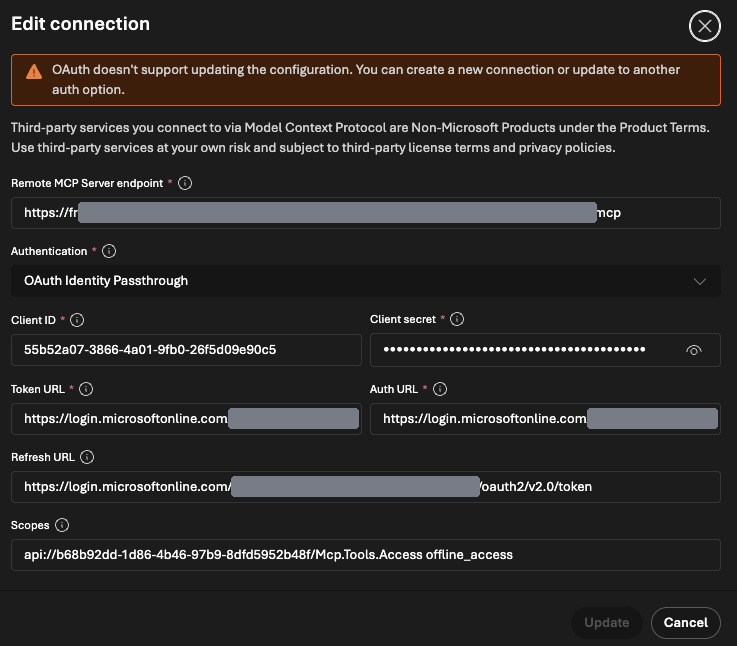
Key insight: The portal says “OAuth doesn’t support updating the configuration. You can create a new connection or update to another auth option.” If you mistype the secret or a URL you create a new connection. A new connection gets a new redirect URL and you have to add that one to the client app as well.
Step 4: Add the redirect URL to the client app
In Entra add the URL as a redirect URI of the platform Web. With the CLI it looks like this.
az ad app update --id <client-app-id> --web-redirect-uris "<redirect-url>"
az ad app show --id <client-app-id> --query "web.redirectUris" -o json
--web-redirect-uris replaces the whole list. If you add a second connection later pass all URLs in one call.
Step 5: The first call and the consent
I created an agent with this connection and asked: “Call the whoami tool and show me the full result.”
The chat did not call the tool. It showed a consent request with the buttons “Open consent” and “Cancel” (the item type is oauth_consent_request).
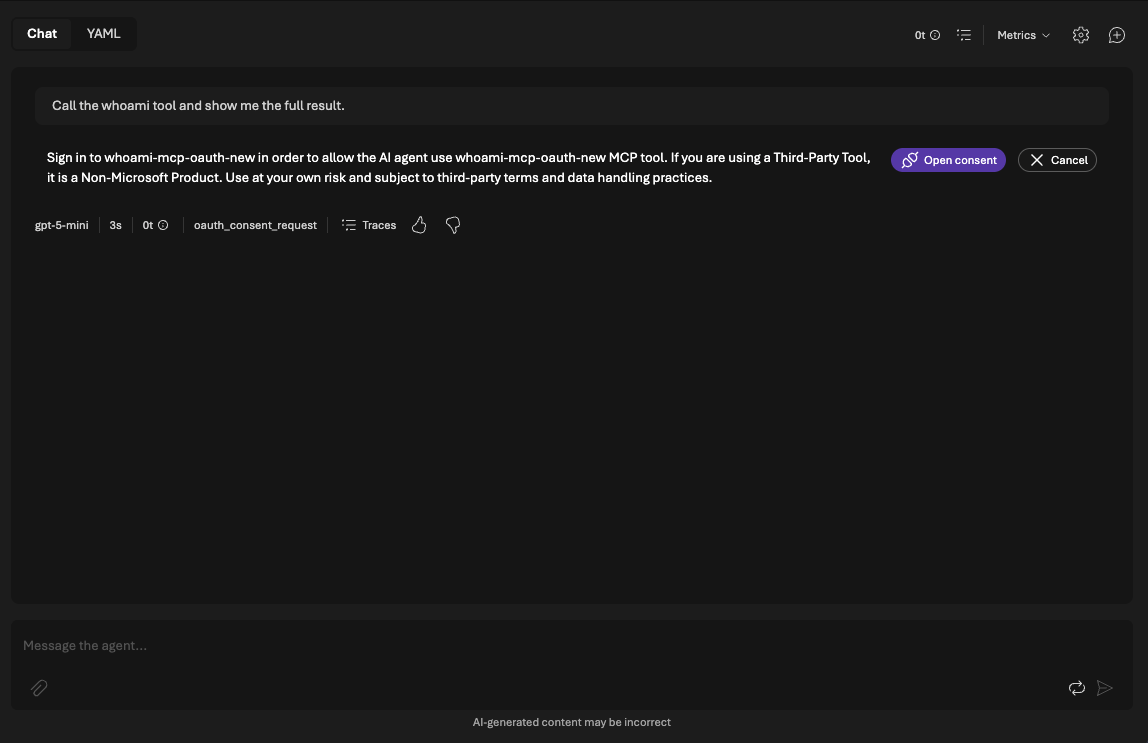
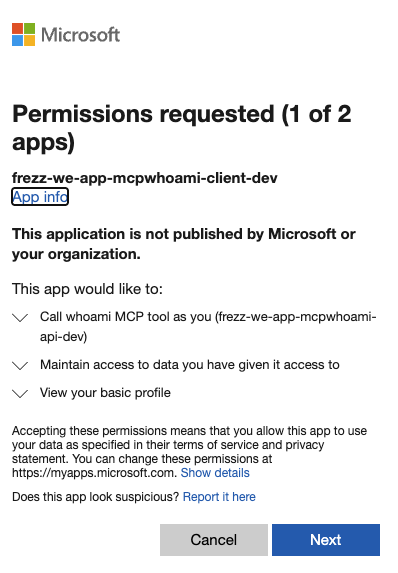
“Open consent” opens a window outside of the chat. In my run it took three steps, one after the other:
- Entra, app 1 of 2: The client app asks for the scope “Call whoami MCP tool as you”, the text I wrote in step 1.
- Entra, app 2 of 2: A second dialog for the API app asks for basic profile access. I do not know why Entra splits it into two apps and I do not rely on it.
- Foundry, “Confirmation required”: A page with a phishing warning and a checkbox (“I have verified this request and trust the source”). Only after the checkbox the button “Allow access” works.
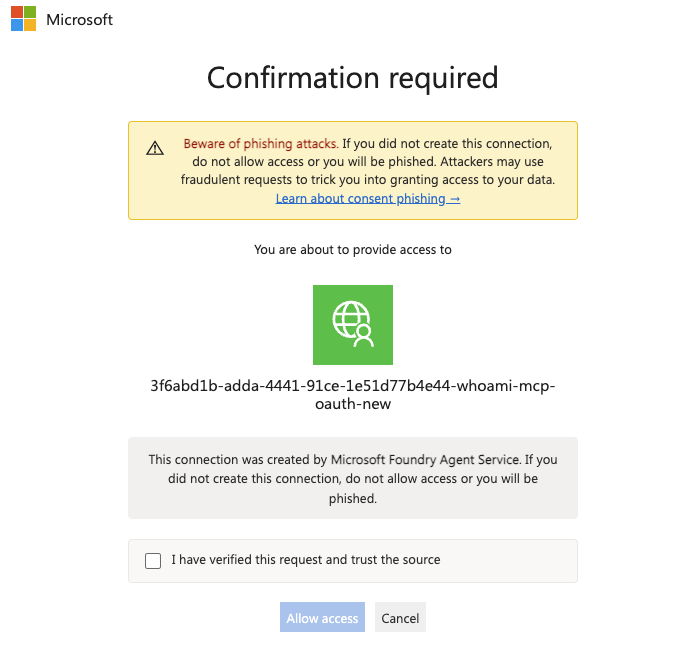
After that the window says “Authentication successful” and the chat asks for the tool approval. The first time I ran this a page with “Authentication failed … Code … not found” showed up right after the consent. The chat still said “Sign in successful”. I do not know why the page appeared and I could not reproduce it.
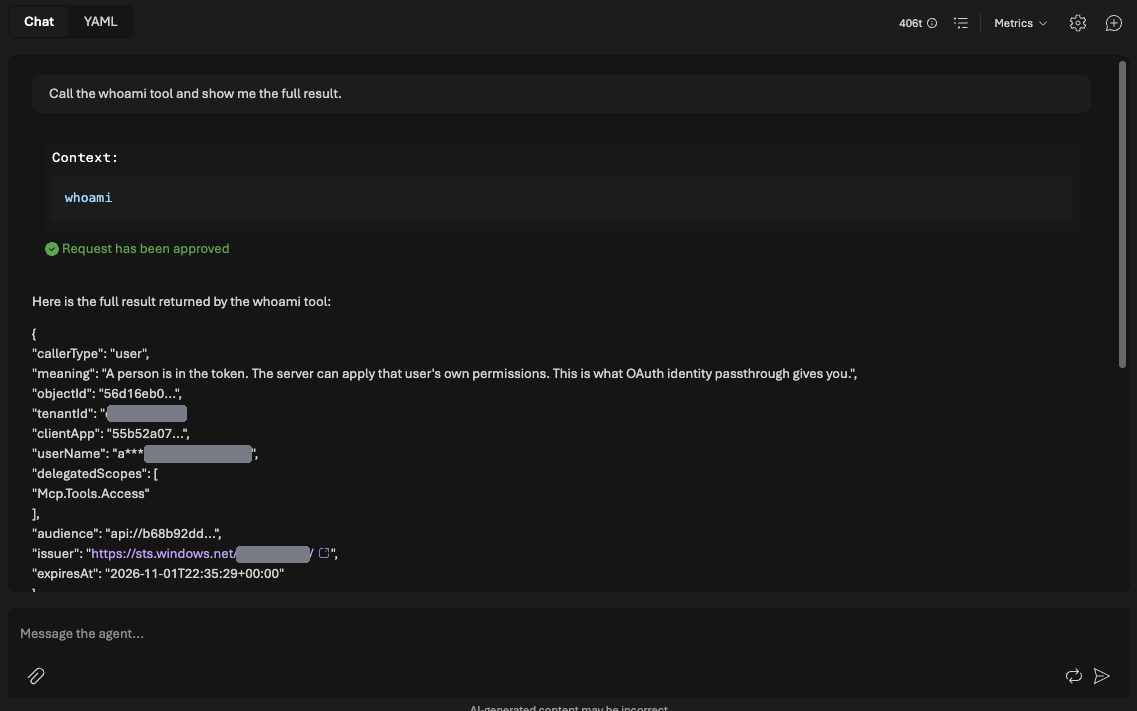
After the approval the answer looked like this:
{
  "callerType": "user",
  "meaning": "A person is in the token. The server can apply that user's own permissions. This is what OAuth identity passthrough gives you.",
  "objectId": "56d16eb0...",
  "tenantId": "e44d86aa...",
  "clientApp": "55b52a07...",
  "userName": "a***",
  "delegatedScopes": [
    "Mcp.Tools.Access"
  ],
  "audience": "api://b68b92dd...",
  "issuer": "https://sts.windows.net/e44d86aa.../",
  "expiresAt": "2026-11-01T22:35:29+00:00"
}
| Field | Workload (last post) | User (this post) |
|---|---|---|
callerType | application | user |
userName | none | masked user name |
delegatedScopes | none | Mcp.Tools.Access |
appRoles | Mcp.Tools.ReadWrite.All | none |
clientApp | the calling application | the client app from step 2 |
Two details. The issuer is sts.windows.net again. The token is a version 1 token because I left the token version of the API at its default. The token URL is a version 2 endpoint and still the token is version 1. My server accepts both formats. And clientApp is now my own client app. It shows which application acts on behalf of the user.
Key insight: The server now sees a person. It sees it only because the user consented. Without the consent there is no user token.
What Entra stored
I checked the consent in Entra:
az rest --method GET --uri "https://graph.microsoft.com/v1.0/oauth2PermissionGrants?\$filter=clientId eq '<client-service-principal-id>'" --query "value[].{scope:scope,consentType:consentType}" -o table
| Scope | ConsentType |
|---|---|
offline_access | Principal |
Mcp.Tools.Access | Principal |
Principal means the consent belongs to one user. No admin was involved. The two rows match the scopes in the connection.
The grants can be deleted with az rest --method DELETE on oauth2PermissionGrants/<id>. I did that to see the dialogs again. At the next call Entra asked again and created the same two rows. Deleting the grants therefore resets the user side and nothing else. The token that Foundry holds for an existing connection is a separate thing and I did not test whether it stops working.
Consent belongs to the connection
I created a second agent with the same connection and asked the same question. No sign in window appeared. Only the tool approval was left. That matches the docs: consent is stored per tool per project and not per agent.
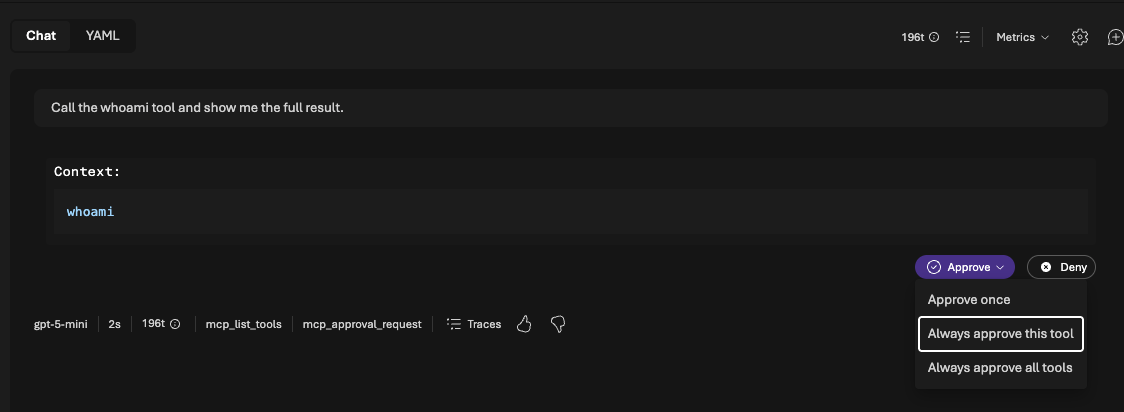
The approval is a different thing from the consent. The default require_approval is always. Foundry asks before every call and offers three choices.
What happens when the user says no
I deleted my grants and tried the decline on a new connection (a connection that has no stored token yet). I did it at two places:
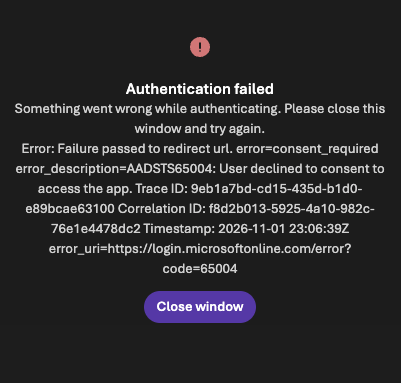
Cancel in the Entra dialog –> The external window shows error=consent_required with AADSTS65004: User declined to consent to access the app. The message comes from Entra. Afterwards the grants list was empty and the server log had no new request.
Cancel on the Foundry confirmation page –> I had already clicked Next and Accept in Entra. At that moment both grants existed. Then I cancelled the confirmation. The window says “Error: User did not consent service sign in.” The two grants stayed. So the consent in Entra and the confirmation of the connection are two separate decisions. Cancelling the second one does not undo the first.
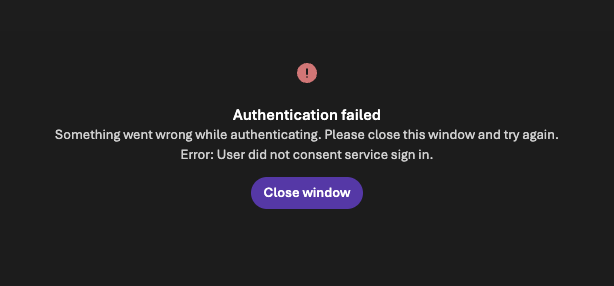
In both cases the playground showed “Sign in successful” in green and offered the consent request again.
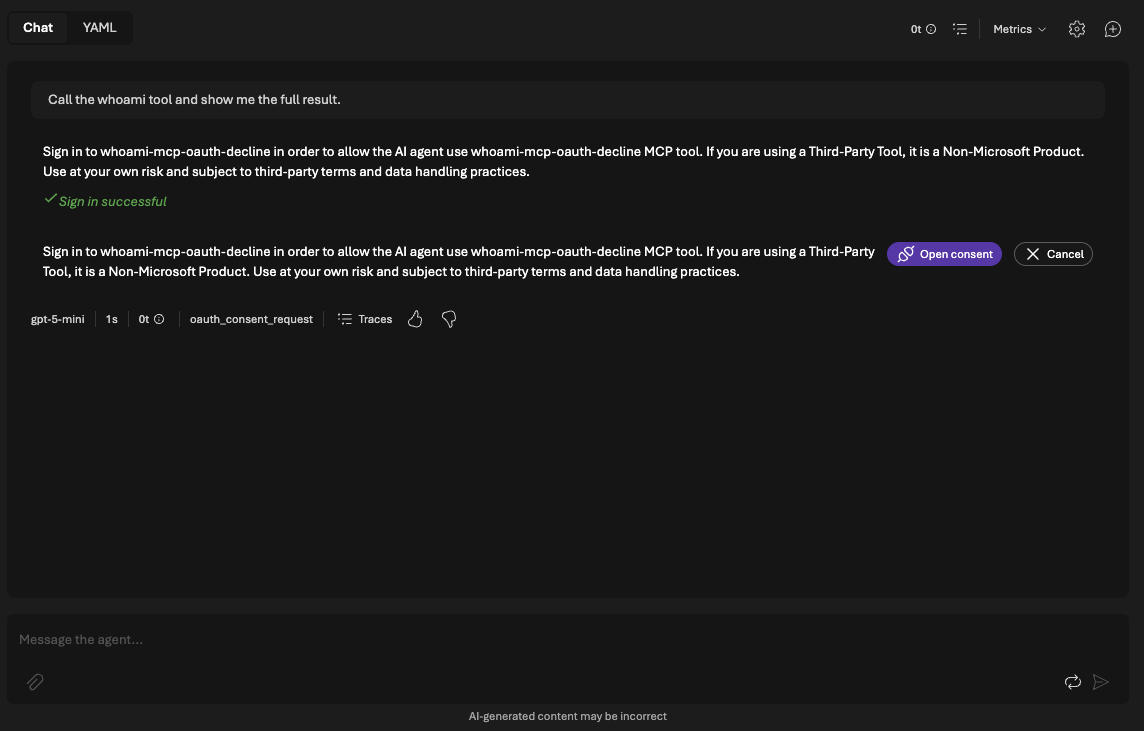
This matches the docs: opening or closing the window does not prove consent. A declined consent does not lock the connection. I clicked “Open consent” again. Entra did not ask a second time because the grants were still there. The confirmation page came directly. After “Allow access” and the approval the answer was callerType: user again.
Key insight: The green “Sign in successful” is not a proof. Look for the tool result. The server log tells it too: no
POST /mcpand no audit line means no call.
Let the server enforce the scope
In the last post I added REQUIRED_ROLE to the demo. The setting also works for a scope. My verifier writes scp and roles into the same list and the SDK checks that list. I did not change any code:
az containerapp update --name <app> --resource-group <rg> --set-env-vars "REQUIRED_ROLE=Mcp.Tools.Access"REQUIRED_ROLE | Token of the user | Result |
|---|---|---|
Mcp.Tools.Access | has the scope | 200 |
Mcp.Tools.Other | has not this scope | 403 |
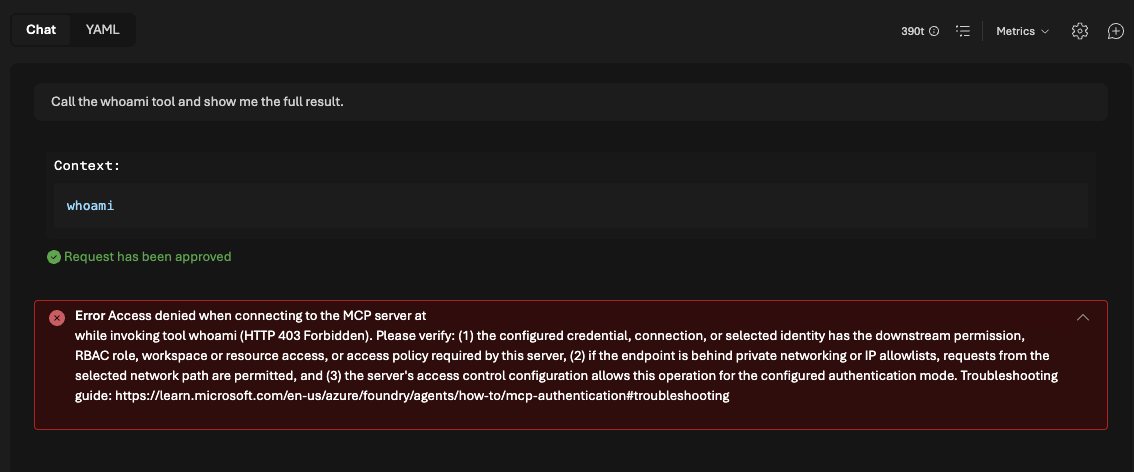
For the 403 Foundry shows the same long and general message as for a missing app role (see the [last post](TODO: URL of the hosting post)). It does not tell whether a role or a scope is missing. If you see it check both.
Does the token renew itself?
My first token expired at 22:35 UTC. A new conversation after that returned expiresAt: 2026-11-02T00:02:40+00:00. The same objectId and no new sign in window. The offline_access scope was part of my connection and the docs recommend it for this. I did not test the connection without it.
A word on audit logs
The demo never logs the token. Until now it did not log who called either. Uvicorn writes only the status code. A server that sees a person should leave a trace of that person, so I added one line per tool call:
2026-11-01 22:08:08,866 whoami.audit whoami called callerType=user objectId=56d16eb0... clientApp=55b52a07... scopes=Mcp.Tools.Access roles=-
The line shows the masked object ID and the scope. It never shows the token or the user name. A unit test checks that. For a workload token the same line shows callerType=application and the role in roles (I checked that in a unit test and not in Azure).
One limit: a 403 is not in the audit log. The SDK rejects the call before the tool runs. The log shows only the status code there. If you must audit rejected calls you need a check in front of the SDK.
What I did not test
- A second user: The docs say consent is per user. I tested with one user.
- The role Foundry Agent Consumer: The docs recommend it for end users. I am the owner of the project and did not need it.
- Cancel in the second Entra dialog (2 of 2): I cancelled in the first Entra dialog and on the Foundry page. The second Entra dialog I did not cancel.
- A stored token after deleting the grants: I deleted the grants only before using new connections. I did not test what an existing connection does after that.
- Handling
oauth_consent_requestin your own client: The docs show Python and .NET samples. I used only the playground. - The delete path for the client app in the teardown script: I ran the script after the resources were already gone. It reported nothing to delete. The loop over both apps is written but I did not see it delete the client app.
Common pitfalls
| Symptom | Likely cause | Fix |
|---|---|---|
| The connection cannot be edited | OAuth connections are fixed after creation | Create a new connection and add its redirect URL to the client app |
| You do not know the redirect URL | Foundry shows it only after the connection exists | Create the client app first and add the URL after the connection |
| Scopes do not work | Separator in the field | Use spaces in the portal. The CLI page says commas |
az ad app update --set api.oauth2PermissionScopes fails with Couldn't find 'api' in '' | I did not find the reason | Set the scope with a PATCH to Microsoft Graph |
az suggests az ad app permission grant | Default hint after permission add | Skip it. The user consents at the first call. Use it only if your tenant blocks user consent |
| The playground says “Sign in successful” but the tool does not run | The window was closed or the consent was declined | Look for the tool result and for POST /mcp in the server log. Click “Open consent” again |
| The agent answers without calling the tool | Same chat and the model answers from the history | Start a new conversation |
A page says Authentication failed ... Code ... not found | Unknown | Check the chat. For me the sign in still worked |
The token has the issuer sts.windows.net | Token version of the API is null | Accept both issuer formats on the server or set the token version |
HTTP 403 Forbidden in a long general message | The scope or the role is missing | Check which one the server requires |
Clean up
This time there are two app registrations (API and client) and a connection. Delete the resource group and both apps. The demo repo has deploy/teardown.sh for that. It deletes both apps and the resource group and with --purge it frees the names again.
az group delete --name <rg> --yes --no-wait
az ad app delete --id <api-app-id>
az ad app delete --id <client-app-id>
The connection and the agents are part of the Foundry project in the resource group. Purge the Foundry resource as in the last post if you want to reuse the name.
Practical checklist
- Add a scope to your API: Type
Userso that users can consent. - Create the client app: Service principal, permission for the scope and a secret that stays out of your repo.
- Create the connection: OAuth Identity Passthrough with spaces between the scopes and
offline_accessincluded. - Add the redirect URL: Platform Web and the URL from the connection.
- Call the agent in a new conversation: Sign in once and approve the tool.
- Read the
whoamianswer: ConfirmcallerType: userand the scope. - Enforce the scope on the server:
REQUIRED_ROLEwith the scope value. - Log who calls: One masked line per tool call and never the token.
- Delete the resources: Both app registrations and the resource group.
Key takeaways
- For your own MCP server you need custom OAuth. Managed OAuth with a Microsoft audience is blocked (according to the docs).
- Create the client app first. The redirect URL comes after the connection.
- An OAuth connection cannot be edited. Create a new one.
- The user consents once per connection and project. A second agent does not ask again.
- The server sees a user token with
scpand no app role. - The same server setting enforces a scope. No code change needed.
- Foundry shows the same general
403for a missing role and a missing scope. - Log the caller identity yourself and never the token.
- The consent has three layers: Entra, the connection confirmation and the tool approval. A decline in one of them does not lock the connection.
- “Sign in successful” in the playground proves nothing. Check the tool result.
What comes next: So far the question was who calls the tool. The next question is which tools an agent may use at all. In the next post I look at governance for MCP tools with the AI gateway in Microsoft Foundry (Governance).
Sources
- Set up authentication for Model Context Protocol (MCP) tools (Microsoft Learn)
- Connect to Model Context Protocol servers (Microsoft Learn)
- User delegation for tools in Microsoft Foundry (Microsoft Learn)
- Expose a web API with delegated scopes (Microsoft Learn)
- Add a redirect URI to an app registration (Microsoft Learn)
- [Hosting Your Own MCP Server for Microsoft Foundry on Azure Container Apps](TODO: URL) (frezz-tech.de)
- Which Agent, on Whose Behalf? Authenticating MCP Tools in Microsoft Foundry (frezz-tech.de)
- foundry-mcp-auth-whoami-demo (GitHub)